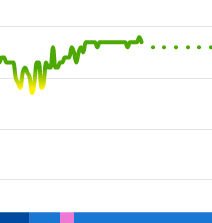
1 minute intervals indicated in Garmin Connect Web as solid green lines. 5 minute intervals indicated by dotted green line.
Is there someway to force the interval to something < 5 minutes? Thanks!
1 minute intervals indicated in Garmin Connect Web as solid green lines. 5 minute intervals indicated by dotted green line.
Is there someway to force the interval to something < 5 minutes? Thanks!
I just checked my data for the last night, and I have a PulseOx value every minute, all night long (on Instinct 2). So either you may have a device trying to optimize the power consumption of the PulseOx sensor, that is quite power-hungry, or the watch had problems to detect the SpO₂ value. For example due to a loose wristband, or due to other factors.
Although, in the later case, it would not result in a perfectly regular 5 minutes interval, hence I guess the first case is more probable.
Interesting on the Instinct 2 interval fixed at 1min. So your GC Pulse Ox graph is continuous, not dotted then?
Instinct2 is new in the past few months, right? I'm using Fenix5X+, my understanding is it's one of Garmin's first Pulse Ox watches, so maybe not the best algorithm or power-hungry sensors?
GC shows interval abruptly switches from 1min to 5 and doesn't revert, best as I can tell. Been tightening up on the band, doesn't seem to improve.
Yes, I have a continuous graph. Instinct 2 is indeed a new model. However, SpO₂ data each 5 minutes are more than sufficient for detecting sleep disorders like sleep apnoea, or some other respiratory deficiencies, so in your place I would not care much.

For whatever reason, I can have ~2-3 minute drops in Oxygen saturation, as excerpt of my GC graph shows. Not sure what algorithm Garmin might be using to jump from 1min to 5 minute intervals...but it doesn't seem appropriate for me.
I haven't found any correlation with battery state of charge and duration of high sample rate, but haven't investigated carefully yet.
BTW, found your interesting post Export pulse ox data timeline where you describe how to download GC pulse ox data using DevTools. Not to go off topic, but, will this allow me to learn if GC might be removing some samples in their graphs?
Not to go off topic, but, will this allow me to learn if GC might be removing some samples in their graphs?
I do not really believe that some the recorded data is being removed by the javascript of the GC Web site, hence I do not think you would find more data in the background than what you see in the graph, but you can certainly try it.
Yeah, you're right, the Javascript (I think that's what I'm looking at) suddenly goes from timestamps 1 minute apart to 5 minutes apart. Don't know if its pertinent, there is a parameter called "readingconfidence" that varies from maybe 3 to 17...any idea what that means? Assuming a high number means higher confidence. I don't see any obvious trend in readingconfidence when the interval changes.
This makes me realize that what's being displayed is the result of GarminExpress app sucking the data from my Fenix5X+, then some servers at Garmin massaging it in some unknown manner, then sending it back to GarminConnect for the pretty graphs. So then the question is, is there any way to get raw data on PulseOx directly from the Garmin device? Analogous to being able to read from Garmin device .gpx or .fit files.
This makes me realize that what's being displayed is the result of GarminExpress app sucking the data from my Fenix5X+, then some servers at Garmin massaging it in some unknown manner, then sending it back to GarminConnect for the pretty graphs.
I do not think so. It would then happen to everyone, and as I already wrote, it does not.
Raw data are being transferred to the server in one of the fit files. Not sure about PulseOx data, but I'd tell it is in the Monitoring folder, just like the HR. Just note that the monitoring files (unlike activity files) are being deleted on a successfull sync, hence you have to disable syncing (shutting down Garmin Express and Garmin Connect), before trying to access the files over the USB cable.
However, almost certainly it is your device that records the data in this manner, most probably to save the battery power.