This discussion has been locked.
You can no longer post new replies to this discussion. If you have a question you can start a new discussion

lost my intensity minutes

This software is so buggy.  I just lost my intensity minutes after a year of use and no changes to my devices or software.  Crap had a mind of its own.

  •  I just lost my intensity minutes after a year of use and no changes to my devices or software.

    If you lost intensity minutes, there is certainly a reason for it. However, you'll have to explain what exactly you mean by losing the IM, and where you lost them (watch? phone app? web interface? all of them? history too?,...) 

  • Turns out the app isn’t smart enough for much.  In addition to this constant menstral tracking problem, various settings and features randomly get activated or deactivated with no input or changes from the user.  This appears to be the key problem with the menstral tracking... Garmin updates something in their end and we users observe undesired and I requested behavior.   Example, my intensity minutes card, which I viewed from the apps main page, simply disappeared the other day after a year of constant use, no changes to settings or devices on my part. It can not be restored and is shown as active in the My Day settings.  This app is really a mess. The fan bois here on the forum are quick to point the finger of blame at the poster and send you on a fruitless goose hunt to try to resolve these types of issues.  The reality... something is happening behind the scenes which negatively affects the user experience.  If I were the CEO, I would be concerned these things get resolved, there is no reason for it.

  • As trux is offering assistance, can you post details regarding your intensity minutes issue?

    you'll have to explain what exactly you mean by losing the IM, and where you lost them (watch? phone app? web interface? all of them? history too?,...) 
  • constant menstral tracking problem

    Menstrual tracking is available only in accounts where the user did not specify the gender, or has set it to Female, when creating it. So you can only blame yourself for this. Male users who set up the requested data, do not have any menstrual tracking in their accounts.

    my intensity minutes card, which I viewed from the apps main page, simply disappeared the other day after a year of constant use

    The IM pane will show on the app, only when some IMs were already logged that day. Check the web interface (connect.garmin.com/.../intensityMinutes), to see whether it was the case.

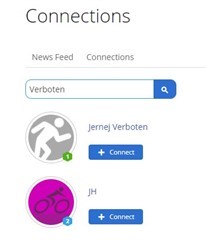
    Otherwise, a possible reason for some missing data might be if you associated your device with multiple accounts. When looking up "Verboten" in GC, I get several accounts, and two of them might be perhpas yours (see below). If it is that case, you'll have to remove the device from one of them. Carefully follow the instructions from the support document Data is Missing from My Garmin Account After Syncing to resolve the issue.

  • Thanks for the ideas, but none of these suggestions result in a fix.  I only have one user account.  I've essentially given up on Garmin between the issues and how my reasonable and civil posts get deleted from this forum when someone doesn't like the truth shared in them.  Anyhow, I was reminded of this topic because I received an email due to someone "liking" my Male Menstral Cycle thread.  A sad state of affairs.

  • Which watch model do you own? Does it have a widget or a data field for Intensity Minutes? If so, does the watch show any, or not? If it does, and Garmin Connect does not, then follow the tips from the Troubleshooting guide for (some) data missing after syncing, especially the hint #4. Anyway, do it even if the watch has no way to display the Intensity Minutes. But if the watch can display the IM and shows 0, then please post the HR graph of a sample activity, and a screenshot of the daily HR for the same date. We'll see where the problem comes from.

    As for the Menstrual Cycle, apparently you did not select Male gender when creating the account (either left it unselected, or inadvertently selected female). In such case the only way to get rid of it, is calling the Support directly and asking them to remove it, or creating a new account with properly assigned gender. If your local (non-US) support is unable to help, call the headquarters in the US Support Center, or ask your local support to forward your demand to them. The consequent changing of the gender, once the account was already created with the wrong one, will not help.