This discussion has been locked.
You can no longer post new replies to this discussion. If you have a question you can start a new discussion

Show only active calories in bar graph - possible?

Hi All, 

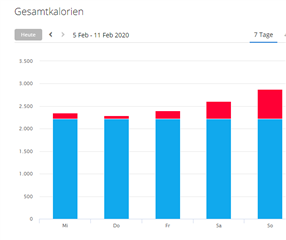
in reports you can either show all calories, that means resting calories+active calories:
Or activity calories (activity burned only during activity:
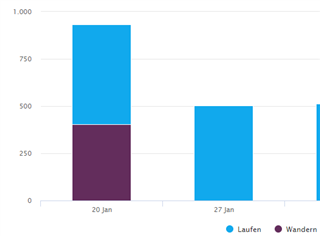
But is there a way to display/analyse activity calories only like on the watch itself?
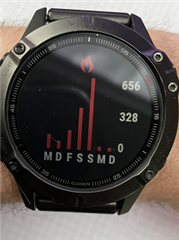
This would be the first picture in this post, but with hidden resting calories. Is it possible to display it like that in garmin connect? I prefer active calories before activity calories since i do a lot of daily steps without recording it in a activity.

Thanks for your advice.

Michael

  • Is it possible to display it like that in garmin connect?

    No, it is not. Only the graph including the resting calories (BMR) is available. However, the red bars are identical to those you see on your watch, so you get all the info you need.

  • Thanks for your answer. My problem is though, that with the resting calories in one bar, the active calories scale much worse than when they are shown uniquely. You see the amplitude in the watch pic which would never be displayed like this with resting included, because resting makes 90% of that bar.

  • You see the amplitude in the watch pic which would never be displayed like this with resting included, because resting makes 90% of that bar.

    Maybe you just need to be more active Slight smile Sorry, can't help better. As I wrote, in GC there is no other alternative.