This discussion has been locked.
You can no longer post new replies to this discussion. If you have a question you can start a new discussion

Hi. I accidentally deleted two runs off my garmin connect on my phone after they were synced. How can I restore them?

Former Member
Former Member

I accidentally deleted two running activities off of my Garmin connect on my phone. These activities are still on my watch and I would like to resend them to my Garmin connect on my phone. I tried the laptop....but I cannot find the running files at all. Is there another way to transfer these two activities to my phone?

  • What device do you have? Your best bet is to use Garmin Connect web to upload the activity. Connect your device to your computer. The ".fit" files should be located on your device at D:\GARMIN\ACTIVITY\ (depending on how your PC handles the external drive letter).

    • Click on "Import Data"
    • Click "Browse to select"
    • Browse to the location of the fit files on your device, typically D:\GARMIN\ACTIVITY\
    • Selected the missing fit file(s)
    • Click on "Import Data"
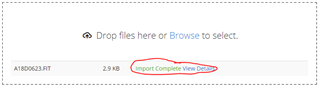
    • If successful, you should see "Import Complete"

    • Click on "View details" to view your activity.
    • This will also show up on your GC for Windows Mobile app (assuming Windows phone, since that's where you originally posted your question)