You can no longer post new replies to this discussion. If you have a question you can start a new discussion
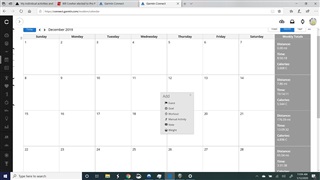
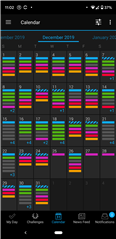
My individual activities and data are synced with my phone, and I can see them. But when I log into the Garmin Connect website, all I see are summaries for the week on the right side...but the days are all blank....How can I remedy?
Former Member
How do I get Garmin Connect website to show all the data that Garmin Connect on my phone already collected from my watch?
How do I get Garmin Connect website to show all the data that Garmin Connect on my phone already collected from my watch?
Both Garmin Connect Mobile and Garmin Connect Web are just two different interfaces looking at the same data of your account stored on the same server. Well, there are some minor exceptions, like for example the Step count that changes live on the app, while needs online syncing, to be stored on the server, but basically the data is pretty identical on both sides. Just the menus are diffrent, so possibly you are just looking for your data at a wrong place. Can you post a screenshot demonstrating the problem? Best would be a screenshot from both the phone app, and from the web page.
Behind the black bar on the left is where you select what shows on the calendar.There are 2 rows of 3 dots just tot he left of the today icon. Click on it and you should be able to select what appears in the calendar from the dialog column that opens.