
This discussion has been locked.
You can no longer post new replies to this discussion. If you have a question you can start a new discussion

Feature request: highlight laps for a total

Former Member
Former Member

I'm so surprised to realise that you can highlight laps/intervals in Garmin connect but not get an everage for all highlighted one's (what's the purpose of the highlight option?). Would be very useful especially when analyzing interval workouts to see how far, what pace, HR etc you had for the whole workout. Such a simple thing...

  • Former Member
    0 Former Member

    Yeah, I asked the same thing like a year ago. What is the purpose of highlighting laps?

    To be fair though, when you use the interval function of your watch you get an additional block of stats (Workout Intervals) that shows you time, distance, and pace of just the the work intervals in total (i.e. minus rest intervals).

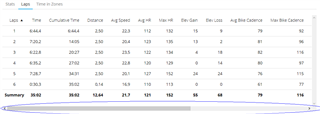
  • I have found it to be useful to highlight laps - I can then select those laps that I wish to examine (maybe every other lap, where I do the sprint in an interval workout e.g.). Then when I scroll to the right to see more data, I know which laps I should look at and can ignore the rest laps.

  • Former Member
    0 Former Member in reply to olni65

    Fair enough, yes, that's what I do sometimes. But to think that this is its sole purpose? There's so much potential in highlighting laps, as TrainingPeaks shows.

  • Former Member
    0 Former Member in reply to Former Member

    I fully agree. This is probably the purpose but exactly as you are pointing out there is so much (easy accessed) data there that would be of great help!

  • I use Connect for years now and just learn I can scroll to the right. There is no visible hint supporting the user there.

    Oh Garmin...

  • While I agree that the documentation and help certainly can be improved and new features announcements would be nice to have along with the new software versions, I think it's a little bit unfair to say in this specific case that there is no visible hint for scrolling. There is a scrollbar at the bottom...