This discussion has been locked.
You can no longer post new replies to this discussion. If you have a question you can start a new discussion

Workout splits being reported by separate miles and not by workout splits

Former Member
Former Member
Hi,
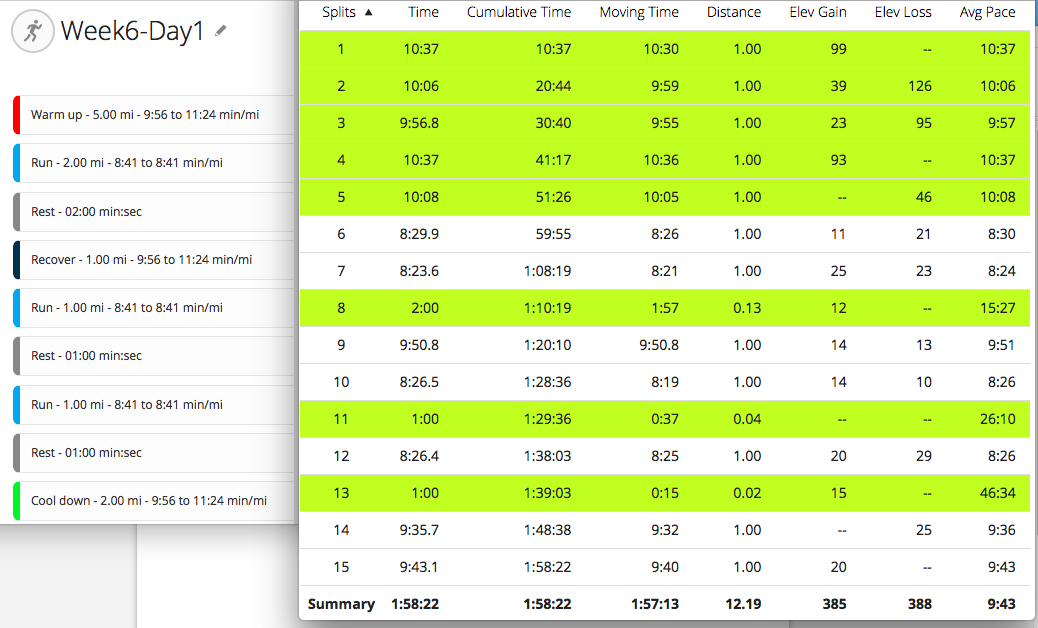
I entered a workout into Garmin Connect. I then completed the workout and saw my splits based on my watch while doing the workout. But when I uploaded the data into Garmin Connect my splits are based on each separate mile and not my workout. Why is that? Is there a way to see my splits based on the workout? The screenshot is of my workout and the completed activity. If someone could help me see my workout splits it would be much appreciated.
Thank you for reading ciq.forums.garmin.com/.../1408928.png
  • But when I uploaded the data into Garmin Connect my splits are based on each separate mile and not my workout.

    As far as I can see, they are based on both:
    • You got a new split every time you went into a new workout step, for example when your 2 minutes rest ended.
    • You also got a new split every time you completed a mile within a workout step.
    The latter is probably caused by the Auto Lap feature of your watch which you can disable.

    (In older Garmin watches like the Fenix 3, Auto Lap would get disabled automatically during a workout, but in newer watches like the Fenix 5+, you have to manually disable Auto Lap if you don't want it in a workout.)
  • Former Member
    0 Former Member
    Thank you for the reply. I have turned off auto lap on my watch. Tomorrow is my next workout. Fingers crossed this works. Thank you again!
  • Former Member
    0 Former Member
    AllanOlesen67 It worked! Removing the Auto lap function allowed me to see my workout by my separate steps in the workout instead of by each mile. Thank you very much for taking the time to reply.