


Hello,
I think there's a bug in a recent release of Garmin Connect on iOS. The same issue does not occur on Android or the web UI.
If I create a round-trip running route in another tool, export a GPX file, and then try to import it into Garmin Connect iOS (via the iOS share feature), then Garmin Connect does not seem to detect the route and give me an option to save it. See screenshot attached.
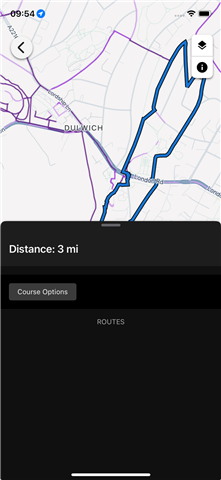
I can't attach the GPX file in question, but here is a snippet:
<trkseg>
<trkpt lat="51.446202" lon="-0.057822"><ele>97.81</ele><time>2026-10-23T08:52:27Z</time></trkpt>
<trkpt lat="51.446104" lon="-0.05817"><ele>97.57</ele></trkpt>
<trkpt lat="51.445885" lon="-0.058505"><ele>96.95</ele></trkpt>
...
<trkpt lat="51.446158" lon="-0.057672"><ele>98.23</ele></trkpt>
<trkpt lat="51.446202" lon="-0.057822"><ele>97.81</ele><time>2026-10-23T09:51:18Z</time></trkpt>
</trkseg>
If I change the *final* trkpt from 51.446202 to 51.446203 (i.e. alter the last digit slightly), then the issue vanishes and the route can be imported just fine.
So the bug seems to be that if the first and last trkpt items are identical, then the app does not allow the import to occur.
Hope this helps!


