When doing a ride on ROUVY, my data comes in but recently it's showing much shorter times.
This morning's 11.67km ride took 19m 4s according to Strava (where the upload from ROUVY also goes) but only 11m and 17s on Garmin Connect.
When doing a ride on ROUVY, my data comes in but recently it's showing much shorter times.
This morning's 11.67km ride took 19m 4s according to Strava (where the upload from ROUVY also goes) but only 11m and 17s on Garmin Connect.
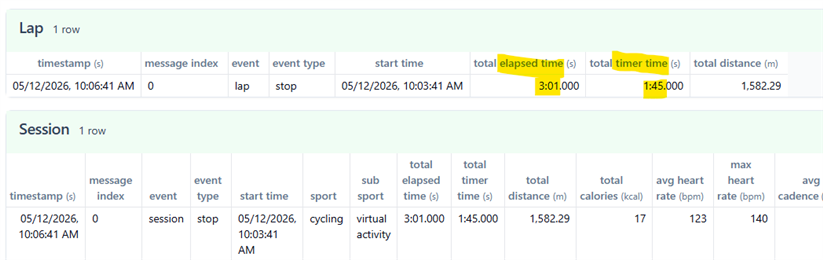
OK, here's the FIT file from a 3 minute cool down ride that it was displaying incorrectly:
https://richardtherider.uk/miscfiles/22851565300_ACTIVITY.fit
Please review the article linked below as to why specific data recorded within third party apps may not match between Garmin Connect.
Data From My Activity Does Not Match Between Garmin and a Third-Party Site
here's the FIT file from a 3 minute cool down ride that it was displaying incorrectly
Yes, that's helpful. The FIT file contains a single lap with Elapsed Time of 3m01s and Timer Time of 1m45s. Please contact the Support at ROUVY, and ask them to fix the Timer Time value.

PS: The overall session has the same values for Elapsed Time and Timer Time, too.
Thanks for digging into, just created a ticket in Rouvy support.
sorry, but I don't see how it even relates to original question. The link you provided mentions Garmin -> 3rd party sync, while we are discussing 3rd party -> Garmin sync here.
Just to check before we point the finger at ROUVY, here are the FIT files from:
Strava - https://richardtherider.uk/miscfiles/ROUVY_Cool_Down_La_Vuelta_2022_Stage_1_Utrecht_NL.fit
and then the original from ROUVY - https://richardtherider.uk/miscfiles/activity_export_fit_260512080642-pfeydnpa.fit
OK, I'm using ROUVY on an Apple TV and noticing that the times were different in FIT files from Garmin, Strava, and ROUVY itself, I sought support, initially from the support chatbot, which suggested:
"The Total Time and Elapsed Time should match.
If they don't, this points to brief communication dropouts between your trainer and the Apple TV.
Apple TV has a strict limit on Bluetooth connections. If there is a momentary drop in the signal from your trainer—even if you don't physically feel it while pedaling—the ROUVY app may think you have stopped. If Auto Pause is turned ON, these micro-dropouts will briefly pause your Total Time, while the Elapsed Time keeps ticking away. Over the course of an entire ride, these seconds can add up to a noticeable difference."
Finding how to toggle off the auto pause setting was challenging, but I found it by opening up a ride selection screen, hitting the Ride Setup button, and turning it off there, which seems to stick then for every other ride I do.
Do you have all laps displayed on Rouvy UI? As reported here www.reddit.com/.../, we only have first two laps shown in Rouvy and Garmin Connect. This is fully matches wrong timing in my case, I have two laps both 5 min, so 10 minutes displayed in Garmin Connect in total.