This discussion has been locked.
You can no longer post new replies to this discussion. If you have a question you can start a new discussion

Garmin connect logging and sending walking data to Health app over night

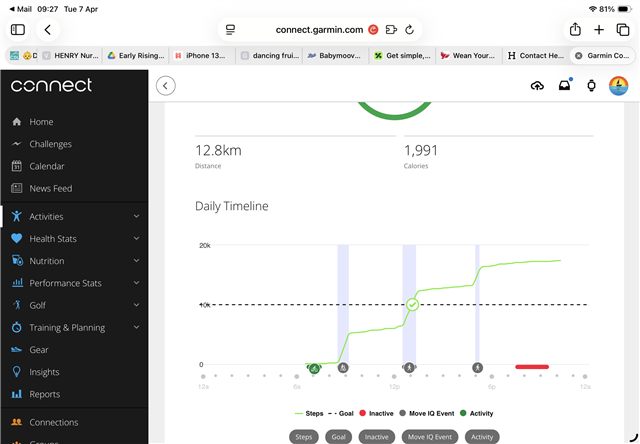
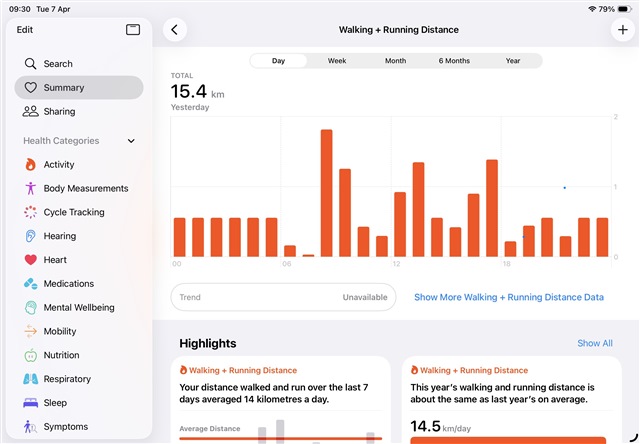
My Health app on the iPhone shows 0.63km of distance between midnight and 0600 every night even though I am not moving. The data sources show this is from my Garmin Connect app however I am not wearing my watch. These do not match each other on a daily basis. For example, today my iPhone app says 15km and 13,000 steps and my Garmin watch shows 12.7km and 17,200 steps. Both items have been on my person all day when I have been moving/awake so should be similar. Can anyone explain why this happens and how to correct it please? 

Thank you 

Top Replies

All Replies

  • How does the Steps graph look like in Garmin Connect Web - for example at https://connect.garmin.com/app/steps/2026-04-06/0 (for the last night)? If there are any steps detected during the sleep, then either you are somnambul, or sleep on a vibrating bed, or excessively move the arm wearing the watch during the night.

  • HI, there is no data/steps/movement overnight on the connect app as I do not wear my watch and my bedside table where the watch is, switched off,  does not move either! These data is visible on the health app only, see screen shots from yesterday showing the discrepancy in the distance. Any ideas? 

  • Any ideas?

    As no steps are recorded during the sleep, the steps data from the watch look fine to me. And I have no idea why Apple Health shows some steps during the night. Perhaps you should contact the Support at Apple and ask them. They could check the logs and see from where the data comes from.

  • Thanks, the ‘data sources’ setting in the iOS health app show that 0.63km is being sent every hour from midnight to 0600 from my Garmin connect to the apple health app. This led me to posting my question on here. 

  • Sorry, I do not know, and from the screenshot you posted, it is not apparent where the data comes from. The Support could find out whether it is due to some misconfiguration, stuck incomplete sync process, bug on one of the sides, or data from the phone itself, or whatever else. Best, contact the Support on both sides, and let them investigate it.