Garmin Connect and ErgData issues with wrong data

Hi! I’m a Concept 2 rower with the PM5 monitor. Also using the Instinct 2x Solar. Is anyone else having issues with importing your Concept2 rowing data correctly to Garmin Connect for iOS?

The workout is transferred to GC but the numbers is off. It shows higher splits, total times and more. Some things are correct, but a lot is wrong.
I’ve tried two ways. First I synced GC with ErgData (app to app) and did not involve my watch at all (with data being off several seconds in GC). Then I tried to directly connect my Garmin watch to the PM5 monitor and have the watch itself transfer the data after starting and finish a rowing activity in the watch (disconnected the link between ErgData and GC). This had no luck either, the results is still not correct when looking in GC. I think this time the GC app thinks my rowing times are from when I started the activity and stopped it instead of taking into account that my workout was set to 5000m.

It’s like GC reads the data in its own way and not like ErgData and PM5.
Any ideas or experiences would make me grateful!
  • Yes, that's all right. I checked the file and even imported into my test account of Garmin Connect, and TBH, I do not quite understand what exactly you complain about, because I see all the data that you mentioned, correctly displayed in the activity. So I do not really know what more Garmin could do for you.

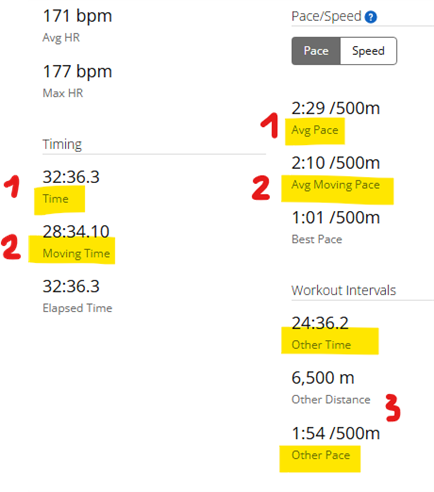
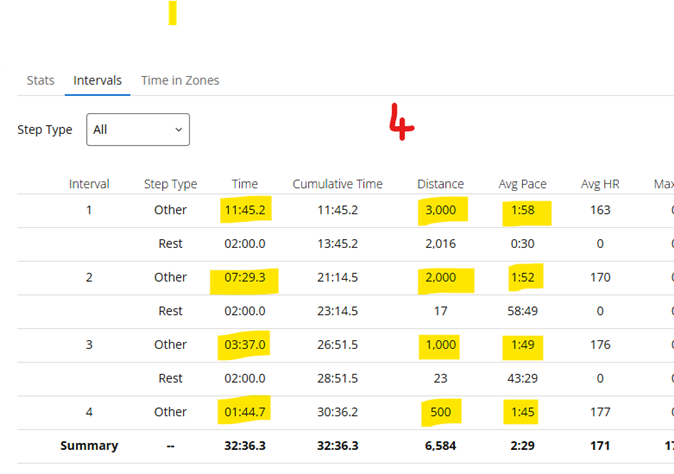
    The activity shows not only the total time (including rests) [#1 on the screenshot], but also the moving time and moving pace [2]. And while that includes also certain time after the end of each workout step, because of the delay before the rowing machine halts, there is are are also the pure time for each workout steps on the Intervals tab [4], and there are also the netto totals as well [3]

  • I'm thankful for your help and first a want to say I'm not here to argue. I'll try my best to explain.

    It's partially wrong numbers in GC, but also the app just don't really gets what rowers want to see up front. I'll try to explain with my weak English.. Sorry.

    Yes, the interval data is correct. That's good and useful. But that is the only thing that is worth looking at as a rower compared to the "1" and "2". No one is interested in how long the machine keeps spinning when I'm already done with my interval or workout. And that's the number that's first showing up in GC. Perhaps it could be in some statics menu somewhere, but not as the "main workout result". The result should be all my intervals combined and no rest taken into account.

    Second, the pace/speed averages (1,2 in your image) is calculated on that exact number that I just explained was kind of useless for rowers. So those averages are just false. I have much better averages because I didn't row during my rest. "Best pace, 1.01min/500m" is totally wrong, even professionals doesn't row that fast. I don't know how GC calculates that one. 

    So to summerize, the interval result and the later interval section is correct, and that is what's interesting for me as a rower. That is what's should be placed at front in the activity front page. The other figures are both totally unnecessary and even wrong.

    You should look how ErgData displays rowing workouts, perhaps it's makes it more clear. But I'm ready to let this go and use ErgData for monitoring my performance and GC for general fitness tracking. 

  • As I already mentioned, this is how it works for every activity type in Garmin. The overall time and pace or speed are based on the total time (minus pauses, if you used them). In running, you may stop for a rest, in cycling you can go downhills without pedalling,, etc, etc, and unless you pause the activity, the timer continues incrementing. I strongly doubt Garmin would change it. And for the fitness metrics it is also unimportant, because it is based primarily on the heart-rate, and it does not matter at all whether you row or not.

    However, you have the netto time and pace (excluding the rests), exactly the ones you are asking for, besides the intervals, also in the Stats`, as "Other Time", "Other Distance", and "Other Pace". So all data is there, you just have to look into the right place.

    The only way you can get the netto time and pace into the top emphasized values, is by recording the activity with your watch, and always pausing the activity as soon as you stop rowing.

  • I get your point about how GC works and why the numbers look like they do. ErgData is obviously a better platform for rowing - GC seems more like one size fits all type of app in that regard and perhaps that’s for the best. Thanks for checking it out!