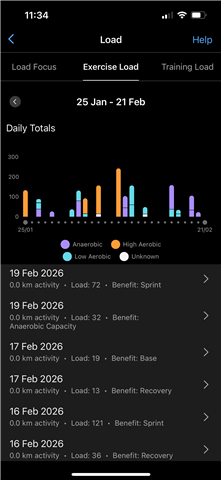
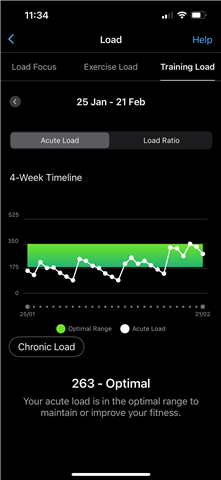
My hrm 600is paired with my connect app and recorded activity’s show but there scores are not included in my exercise load

One of reasons I bought my instinct crossover watch is because it come with the exercise load feature as I wanted to track all my training and how my body is recovering. I also have purchased a hrm 600 to record my Muay Thai training as I cannot wear the watch with the gloves. I have noticed that also the data from the hrm 600 is included on the app as high aerobic and a exercise load score is given. This does not seem to be included in my training load. I have taken a couple of photos of both screens from the app.

Can anyone explain why this is happening ? I have no high aerobic activity on my score now ? The last week shown on the chart I used smaller gloves and put my watch up my wrist for my Thai boxing to see what happened. This recorded as anaerobic and as you can see has been counted in my training load score this time.

I do notice that the connect app sometimes crashes when syncing after I stop my hrm 600 activity. I have reset it and re paired it as I found this as a possible solution online. Usually I managed one activity before the app would start crashing again.

Its all quite frustrating as I invested in these devices to help my manage my training load to prevent over training yet I do not seem to be getting all the data I am recording. 


  • I forgot to add these photos from before. All my high aerobic activity is when I am wearing my hrm 600. The last weeks activity that’s logged as sprint was using my watch like I described in the previous post. As you can see my training load has jumped up as it has been added to the score

  • Can anyone explain why this is happening ?

    Training Load is calculated by the watch (similarly as the most of other metrics too). Standalone HRM 600 does not calculate it. You have to record the activity with your Instinct 3, not with HRM 600. It means, confirm that the HRM is connected, start the activity on your watch, leave it in your bag, do your training, and when finished stop and save the activity while still wearing the HRM. Do not choose the option Download HR from the activity menu when saving the activity! It happens automatically, and duplicating it may corrupt the data.

  • Okay that is for that still haven’t got it quite right. Thought it started it for mma in the gym today from my watch while wearing my hrm 600 then had a green flashing light on it while training with my watch in my bag. I took the strap off when starting sparring but didn’t turn the watch off. I have the heart rate data on my connect which I did not have before but did not get the activity. 

    I then tried again later setting it for a hiit workout while wearing the hrm 600 again green light but the timer kept running with my watch so I did the quick session then put the watch on again and stopped the workout. The workout is there Thai time but only the part at the start and end when I was wearing my watch. I am unsure now if I still had the hrm on while it finished saving but did not get any option to down load data when saving it.

    The data is there in connect apps heart rate section but no activity saved again. I may be doing this wrong. Should I be getting a blue light on the hrm when it’s running like before when I was setting the activity running through the app ?

  • Thought it started it for mma in the gym today from my watch while wearing my hrm 600 then had a green flashing light on it while training with my watch in my bag.

    Either disable the Dynamic Source Switching, or simpler, Set the Jacket Power Mode in the activity settings. It turns off the wrist HR

    sensor off.

    I took the strap off when starting sparring but didn’t turn the watch off.

    If you want to stop the recording, stop it on the watch.

    And similarly, when you want to start another activity, do it on the watch. You can also use the feature Change Sport in order to record the training as several legs of the same Multisport activity