The list of Supported Devices is not sorted alphabetically

I had to scroll down through 5 levels in Garmin Connect on my iPhone 11 Pro before I could find my old Fēnix 5 in this list.
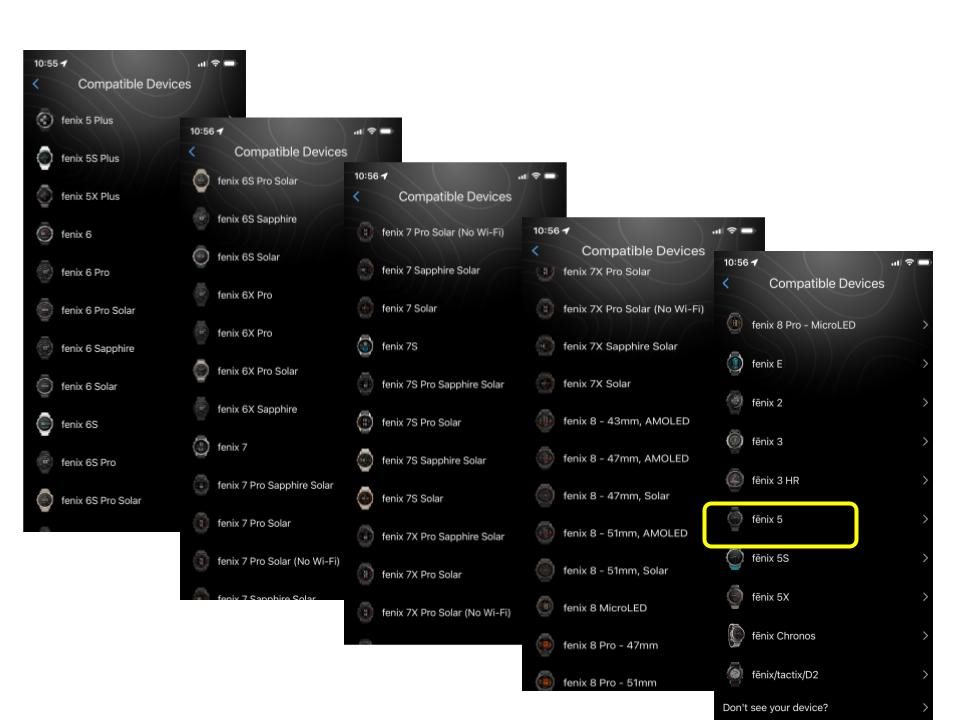
Has Garmin forgotten how to sort list alphabetically?

It's probably because after the Fēnix 5, they replaced the ē with e in the Fenix 6.

  • It's probably because after the Fēnix 5, they replaced the ē with e in the Fenix 6.

    You hit the nail on the head. It's most like a standard case-sensitive, diacritic-sensitive sort, rather than a natural sort that ignores case and diacritics.

    I doubt Garmin will ever fix this, and they have the same kind of problem in other places (like the compatible devices page for Connect IQ apps in the CIQ store website and iOS app).

    > The list of Supported Devices is not sorted alphabetically

    It might be helpful if you specified exactly what you are talking about and/or precisely how to recreate the problem you are seeing - i.e. your screenshots represent the list that's shown when you:

    - tap on the device icon in upper right hand corner

    - tap Add Device

    - wait a few seconds for the automatic device discovery to time out

    - select Fenix

    Otherwise someone could easily think you are possibly talking about something else, like the compatible devices page for a Connect IQ app or something like that.

    Has Garmin forgotten how to sort list alphabetically?

    They just don't care about a good user experience at all