This discussion has been locked.
You can no longer post new replies to this discussion. If you have a question you can start a new discussion

Unable to pair Garmin device to Garmin Connect iOS

With the new update of the Connect app for iOS (5.21.0.28), the way the bluetooth pairing is done with a Garmin device seems to have changed. It is now listed as an accessory for iOS.

However, with the new Connect version I cannot pair my GPSMAP H1 anymore. I can pair with Explore app just fine, but when trying to connect to the Connect app, the app doesn't find the H1. I tried various combinations, like trying to pair only with Connect app, or first with Explore app and then with Connect app, but only pairing with Explore seems to work. The Connect app asks to search for an accessory, but it keeps searching without finding the H1 and eventually reports it cannot find any accessory. Manually selecting the device model in Connect app also doesn't work.

How can I connect my H1 with the Connect app?

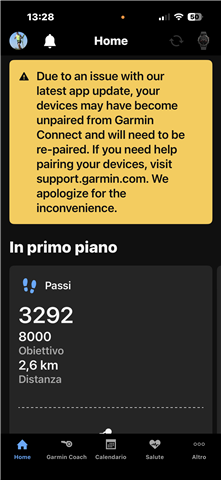
  • 5.21.1.1 isn't for bugfixing this issue, the screenshot is taken from this release Weary

     RE: Version 5.21 had removed all my paired devices. 

  • Ciao a tutti, stesso identico problema 

  • I have tried at least 10 times  - deleted both the Edge830 and Edge 1030 - unpaired everything, shut everything off, turned it back on did all the bluetooth disconnecting, etc.  the device appears to be found, strats to connect says its all connected, but it has another "find an accessory"  but then that never finds the 830.  WTF.  it's getting very old to go through every unstep and restep and only find at the very end, it is not fully connected.  

  • I’m having the issue with updating using the drive app it wont send it over to the camera anyone else have this problem 

  • What worked for my Venu SQ2 the night of the unpairing was uninstalling the Connect app from my iPhone (after all other troubleshooting didn't work), restarting phone, reinstalled Connect app which prompted a sign in to my Garmin account which immediately activated the pairing process. Another app update for the Connect app showed up in my app updates. Threw caution to the wind and updated and it's been paired and working fine since....this hasn't worked for anyone else?

  • Hello,

    After the latest update, Garmin Connect shows a permanent warning about possible sync issues.

    In my case, everything works perfectly:

    • Heart rate updates correctly
    • Activities sync
    • Sleep data is complete

    Despite this, the warning remains visible every time I open the app.

    This is very frustrating.

    As a user, I am constantly told that something “may be wrong” when nothing is wrong. This creates unnecessary worry and reduces trust in the app.

    If my device is working normally, I should not see a problem warning.

    This feels like a technical shortcut that ignores the user experience.

    Please forward this feedback to the product/UX team.

    Best regards,
    Svein Skeide

  • Hello,

    After the latest update, Garmin Connect shows a permanent warning about possible sync issues.

    In my case, everything works perfectly:

    • Heart rate updates correctly

    • Activities sync

    • Sleep data is complete

    Despite this, the warning remains visible every time I open the app.

    This is very frustrating.

    As a user, I am constantly told that something “may be wrong” when nothing is wrong. This creates unnecessary worry and reduces trust in the app.

    If my device is working normally, I should not see a problem warning.

    This feels like a technical shortcut that ignores the user experience.

    Please forward this feedback to the product/UX team.

    Best regards,
    Svein Skeide

  • Yes, this is super annoying. 

  • Same here;  all the attempts to re pair failed. Good gob Garmin! You never sees to amaze me how bad you get do.

    Removing (forgetting) the Garmin in Bluetooth settings worked for me.  Thanks for the tip.

  • I removed the device from Bluetooth in iOS many times - even rebooted the phone most of those times - to no avail. Finally after the 7th or 8th attempt (while also rebooting the watch several times) it worked. Even after the initial pairing, though, setting up the device from GC failed 2 or 3 times before it finally finished.

    Fortunately, re-pairing my HRM Pro and Edge 840 went smoothly.