This discussion has been locked.
You can no longer post new replies to this discussion. If you have a question you can start a new discussion

Title Bar Offset on iPhone 15 Plus on iOS 26.1

Since updating to version 5.19, the title bar is offset to the right therefore touch on the device icon doesn’t work.. App opens ok but once you navigate to another screen and return, it happens. Only resolved by force closing app?
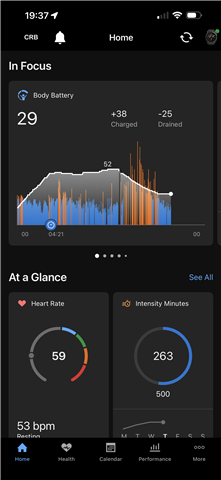
  • Also seeing this on my iPhone 17 Pro Max running iOS 26.1. I can’t say I’m surprised really. 

  • Latest update, 5.19.1.2. has not fixed the issue.......

  •    I've reached out to both of you by email with some questions that I'd like to collect for our senior support team to review in greater detail. I look forward to hearing back from you in those emails. 

  • This still isn’t fixed in version 5.20. This is insane. There’s no way I’m buying new hardware when the iOS app is neglected and legacy. 

  • Absolute joke! I sent all data, many screenshots & a video over a month ago! After Garmin finally understood what I was talking about!! Was told no timescale for a fix! That’s two updates and nothing! But we do get a dark mode icon!! 

    After many years as a Garmin user my patience has finally ran out! I won’t be replacing my epix when it wears out. Already sold my Index Sleep Monitor because of the lack of bug fixes. Good hardware totally ruined my poor software development. 

  • I couldn’t agree more. I have an Epix and I was thinking of buying the 970 or Fenix 8. But I refuse to do so until they put more resources into the iOS app. I’m seriously fed up.

    Well, at least they finally delivered the dark mode icon!


  • Still broken in today’s iOS app update: 5.20.11. However, they’ve managed to make the app worse, which now crashes when clicking ‘safety & tracking’ 

    Garbage. 

  • 2 Months! 4 Updates and still no fix!! Waste of time uploading anything to Garmin Support!! 

  • 5 Updates! Still not sorted!!!