Garmin connect mobile android/ Cannot login or create new account

After I changed my phone I cannot login(or create new account) to my account from android app. Error message was "connection mistake" .
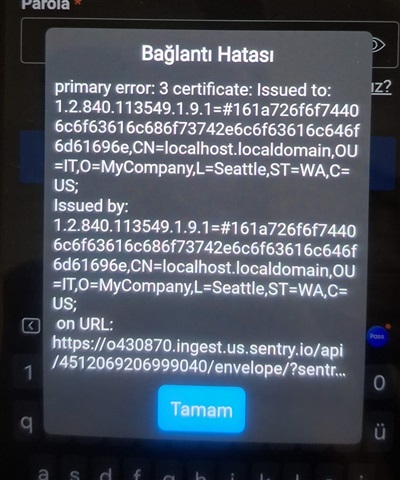
I tried my old phone but I cannot login from there too. I cannot find a support mail adress. İf anyone knows, ı would mail this issue too.

  •   

    Please provide us with the following information:

    • Phone model being used
    • Your phone's operating system
    • Garmin Connect app version being used
    • Confirm if you are able to still sign in to your Garmin Connect account on a computer

    1. After I reset my password and signed out of all devices, I've been having problems logging in again on my android. Any help would be appreciated. I tried reinstalling, restarting my phone, messing with my DNS settings, trying wifi and mobile data etc.
    2. The specific error I'm having is as following

    Connection Error

    primary error: 3 certificate: Issued to:

    1.2.840.113549.1.9.1=#161a726f6f74406c6f63616c686f73742e6c6f63616c646f6d61696e,

    CN=localhost.localdomain,OU=IT,O=MyCompany,L=Seattle,ST=WA,C=US;

    Issued by:

    1.2.840.113549.1.9.1=#161a726f6f74406c6f63616c686f73742e6c6f63616c646f6d61696e,

    CN=localhost.localdomain,OU=IT,O=MyCompany,L=Seattle,ST=WA,C=US;

    on URL:

    1. o430870.ingest.us.sentry.io/.../
  • Garmin Connect Android – Unable to Sign In (Samsung Galaxy S26 Ultra, Türkiye)

    Dear Garmin Support Team,

    I recently purchased a Garmin Venu 4 in the United States and am now trying to set it up in Türkiye, where I live.

    Unfortunately, I cannot sign in to the Garmin Connect Android application. After accepting the terms and conditions, an error message briefly appears, and the application immediately returns to the welcome screen.

    My phone is a Samsung Galaxy S26 Ultra, running the latest available software updates.

    I have already tried the following:

    - Uninstalling and reinstalling Garmin Connect

    - Clearing the application data and cache

    - Switching between Wi-Fi and mobile data

    - Confirming that the region is set to Türkiye

    - Checking Chrome and Android System WebView

    - Restarting my phone

    None of these steps has resolved the problem.

    I can successfully sign in to Garmin Connect through my web browser, so my Garmin account is working correctly.

    This issue has been reported by users in Türkiye for over a month, and there are numerous similar complaints in the Google Play reviews of the Garmin Connect application.

    I cannot use my newly purchased Garmin Venu 4 because I am unable to complete the initial setup.

    Could you please provide a working solution to this problem? I have already exhausted the standard troubleshooting steps and need a solution that will allow me to activate and use my watch.

    Thank you.

  • Are you still running into this? I can see the watch had a successful sync earlier today. 

  • Yes, I managed to resolve the issue, but only by using a VPN.

    I discovered that Garmin Connect was failing to connect to "ingest.us.sentry.io" because it was receiving an SSL certificate belonging to "*.btk.gov.tr" (Türkiye's Information and Communication Technologies Authority), instead of the expected certificate.

    This suggests that the connection was being redirected or blocked at the network level in Türkiye.

    I enabled a VPN, connected through a server outside Türkiye, and was immediately able to log in and complete the setup of my Garmin Venu 4.

    After the initial setup, I turned off the VPN. Garmin Connect continues to work normally, and my watch is syncing successfully without a VPN.

    So, the workaround is to use a VPN for the initial login and setup, then turn it off.

    However, this does not mean Garmin has fixed the underlying issue. Other new users in Türkiye may still be unable to activate their watches without a VPN.

    I hope Garmin investigates why a failed connection to Sentry appears to prevent the entire login process.