When I create a running workout and set a step target to a power zone, the zone ranges shown match my running power zones and the step saves correctly. When I re-open that same workout to edit it, the Set Target picker shows a completely different set of wattage ranges, and the step's target no longer matches what I saved.
Steps to reproduce:
- Create a new Run workout in Garmin Connect (Android).
- Add a Run step, Duration = Distance, 1 km.
- Set Intensity Target = Power Zone, choose Power Zone 5.
- Save the workout.
- Re-open the workout and edit the same step, then open Set Target again.
Expected: the power zone ranges in the editor are the same running power zones used when the workout was created, and the step still shows the target I saved.
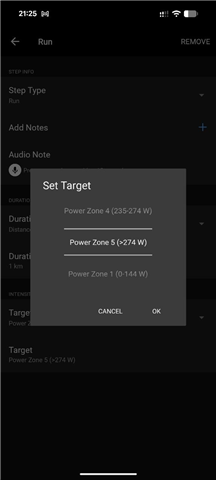
Actual: the ranges are different. On creation the picker shows Power Zone 4 = 235–274 W, Power Zone 5 = >274 W, Power Zone 1 = 0–144 W (screenshot 1, correct — these are my running power zones). On editing the saved workout the same picker shows Power Zone 4 = 405–465 W, Power Zone 5 = >465 W, Power Zone 1 = 262–324 W (screenshot 2), and the step's Target field now reads Power Zone 1 (262–324 W) instead of the Power Zone 5 I saved.
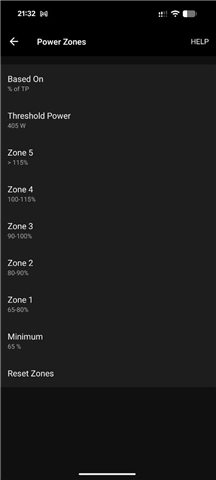
Note that in the editing view, Power Zone 1 starts at 262 W rather than 0 W, which suggests the editor is loading a different zone set (or a different threshold/FTP value) than the one used when creating the workout — possibly the cycling power zones rather than the running ones.
Environment:
- Garmin Connect Mobile (Android) version: 5.29
- Phone model / Android version: Google Pixel 8, Android 17
- Watch model / software version: fenix 8 - 47mm, AMOLED, Software Version Bundle: 23.31
Screenshots attached.
1. Creation
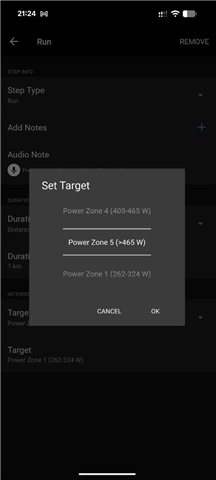
2. Editing
3. Power settings for running