Not recording Walking Activity

A few days ago my app was reset and my Vivomove Sport was disconnected from my phone, probbaly an update i didn't see coming.

Well, after I set every up again I noticed it actually started recording my walks, I didn't even know it could do that, and gave me a cool map with some issues but still cool.

Well, I don't know what happend now but since yesterday after my morning walk it stopped recording my walks, I'v been starting the walk activity manually from the watch to record the starting point accuerly, made sure I'm outside without interferience.

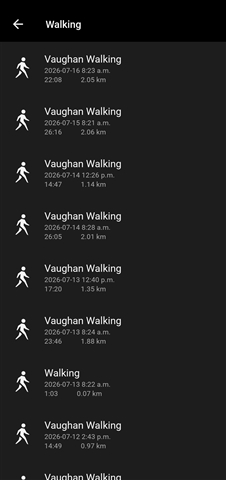
As you can see in the image it recorded the steps but not the Walking

Any ideas?

Top Replies

  • in reply to 4873800 +2 suggested
    And yes, I use the watch option to start the walk and say YES to use the GPS.

    If you start, stop, and save the activity manually, using the GPS is actually not ultimately necessary for it…

  • Yes,   may be right that the app simply timed out, because it did not manage to get the GPS signal. The most common reason for that is that the Connect app does not have location permissions enabled…

All Replies

  • The picture on the right clearly shows that walks ARE being recorded. Date/Distance/Time are all there, that looks like Newa Feed, clikck on one of the walks....

    One other thought. Are you starting a Walk with GPS or a Walk without GPS? If with GPS, did you wait for a GPS to actually start? Did you manually stop/save the activity? And of course, did it upload?

  • Hello they ARE NOT being recorded, if you look and pay attention to detail you can see that even though steps were counted on Friday, there ISN'T a walk recorded for the same date.

    And yes, I use the watch option to start the walk and say YES to use the GPS.

    Thanks 

  • Did the watch actually start using the phone's GPS? You have to have the phone with you as you walk.

    Did you see the activity working on the watch as you walked? 

    Did you save the activity?

    Getting steps and getting a walk activity are 2 separate things. 

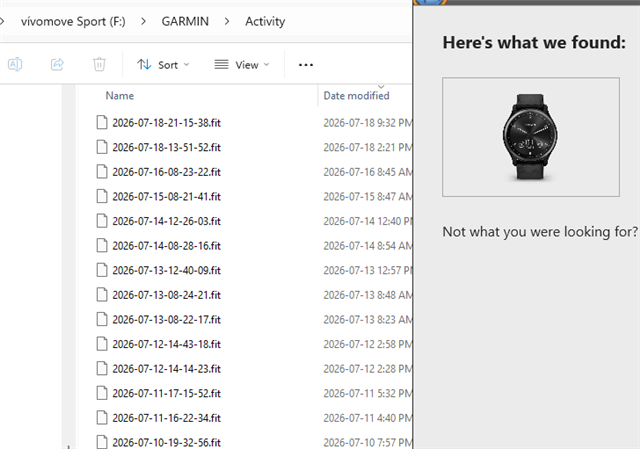
    Did you connect the watch to a PC & see if Express uploads the activity?

    And yes, I seen the detail that you somehow got walking activities for previous days. So what are you doing differently ? 

  • And yes, I use the watch option to start the walk and say YES to use the GPS.

    If you start, stop, and save the activity manually, using the GPS is actually not ultimately necessary for it to appear in Garmin Connect. Without GPS, the activity is stored and synced normally, except that it does not include the track, and some metrics depending on the GPS.

    If the activity is missing in Connect, then it means either that it was not saved at all (i.e. discarding it instead of saving), or that it was not synced (i.e. due to BT connection problems, or because of a corrupted FIT file on the watch. You can find out which of it is the reason by looking up the recorded activities in the History menu directly on the watch - if the missing Walks are there, then there is indeed a syncing problem. Try syncing over the USB cable to a computer with Garmin Express. If it does not help, try importing the corresponding FIT file manually. If you get an error, try repairing it with www.fitfileviewer.com/↷, or post the zipped file here, and a friendly fellow user may try to fix the broken file.

    How Do I Manually Upload an Activity I Recorded to Garmin Connect? | Garmin Customer Support

    And finally, if the missing Walks are neither in the History, nor in the folder //GARMIN/Activity/ on the watch (when checking it over the USB cable), then you either failed to save the activities, or perhaps there is a hardware problem (i.e. damaged storage)

  • Very interesting, 

    Yesterday I went for two walks without the phone and the watch actually recorded them and pushed them to the phone when I came back home. Today I went again WITH the phone, I started the walk activity from the watch as usual, I accepted the GPS usage, I got the notification from the phone that it needs to have clear skies, I kept the phone in my hand and started walking, when I was almost back at home the notification on the phone disappeared, I guess the app is crashing for some reason.

  • You still have not told us what you see looking at the activity  as you walk.

    Did you actually save the activity.

    Doubt the app (Connect?) crashed, more likely it timed out.

    Maybe try downloading the user manual PDF and learn how to use the watch. From your opening post it doesn't seem like you know what it can do.

     I'm done, good luck.

  • Yes,   may be right that the app simply timed out, because it did not manage to get the GPS signal. The most common reason for that is that the Connect app does not have location permissions enabled.