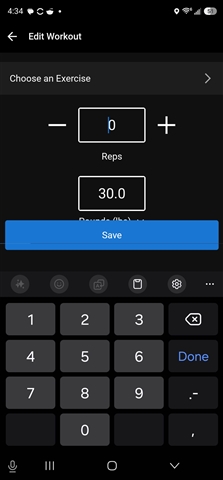
Samsung Ultra 23 - why is the weight input covered by the save button? Yes, I can add the weight, but I can't see what I input. This should be an easy fix!

Samsung Ultra 23 - why is the weight input covered by the save button? Yes, I can add the weight, but I can't see what I input. This should be an easy fix!
I emailed you to gather some additional information so we can push this to investigate on our end.
Thank you for your patience while we investigate this concern.
5080935 Since you are also experiencing this concern, I will reach out to you via email to collect some additional details to help investigate…
Thanks for that video, ACODISPOTI18 . I'm looking into this now and will report back once I've got some additional info.
This looks less like a phone setting problem and more like a Garmin Connect layout issue on Android.
Since you already confirmed:
- Samsung S23 Ultra
- default Samsung keyboard
- default text size
- Garmin Connect updated to 5.25
- uninstall/reinstall did not fix it
- reducing text size only partially helps but makes the whole phone unusable
…it seems the app is not properly resizing or scrolling the weight-entry screen when the keyboard opens. The Save button/bottom panel appears to be fixed in place and is covering the input area instead of the screen moving above the keyboard.
Changing the phone-wide font size should not be the required fix for this. The app screen should handle Android keyboard insets correctly, especially during a live strength workout where quick entry of reps/weight is the main function.
Temporary workarounds you can try until Garmin fixes it:
1. After typing the weight, hide the keyboard before pressing Save.
2. Try Samsung Keyboard’s floating keyboard mode, if available.
3. Try editing the set after the workout instead of during the rest screen.
4. If possible, enter/edit the weight from the watch side and confirm later in Connect.
5. Test once with Gboard to see if the issue is Samsung-keyboard-specific, although Garmin should still handle the default Samsung keyboard properly.
For Garmin, the likely fix is to make this screen scrollable or add proper bottom padding when the keyboard is visible, so the weight field and unit selector remain visible above the Save button. This is especially important because the issue affects live workout logging, not just a cosmetic screen.


I uninstalled the app and reinstalled. I am using the latest Garmin Connect.
This is the best it gets. Is the only way to solve this is to make the text on my phone smaller? If I do that, it affects all the apps.
I mean in the end this is not a huge problem. I can work around it. But I never knew that I could change to Kg directly on the app screen. I will try using the Google keyboard and see if that changes anything. It would be nice if Garmin could try to move things around in the future to make the entire screen visible. I assume I cannot be the only one with this issue. But I do appreciate you trying to help me address this issue to find a resolution.
I emailed you to gather some additional information so we can push this to investigate on our end.
Thank you for your patience while we investigate this concern.
5080935 Since you are also experiencing this concern, I will reach out to you via email to collect some additional details to help investigate this.