Garmin Connect shows every swimming length as "Mixed"

Since a few weeks I started noticing a weird pattern - every single swimming length in my pool swimming activities is labeled as "Mixed" stroke. I assumed this might be due to the stroke detection not correctly identifying what I do in the water, but when I opened the same activity directly on the watch and checked the detected stroke there it was all 100% correct - breastroke and freestyle.

This affects only recent activities, older ones are displayed correctly both on watch and in the app.

Garmin Connect version: 5.24.1

Watch: Epix 2 Pro 51mm, software version 26.09

  • I'd recommend checking your pool settings to ensure the pool length is correct, as well as your auto rest settings. If no laps are recorded but different stroke types are used during the activity, you may see MIXED on the activity. 

  • Thank you for your response. The length is correct (25m), auto rest is disabled. While taking the screenshots which I'm posting below I noticed one more problem.

    Both my watch and app are set to Polish, so to make things clear:

    "Mixed" = "Mieszany"

    "Breaststroke" = "Klasyczny"

    "Freestyle" = "Dowolny"

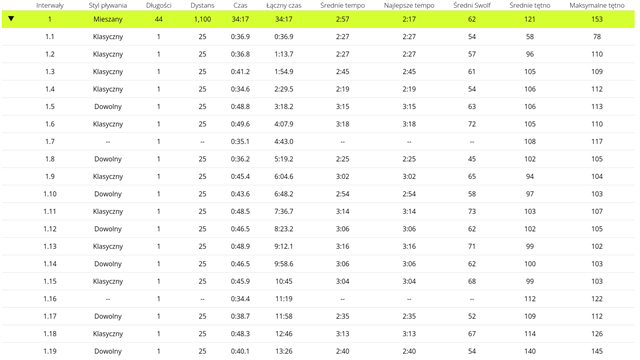
    So, this is a screenshot from Garmin Connect, landscape view of the intervals - all lengths are "Mixed":


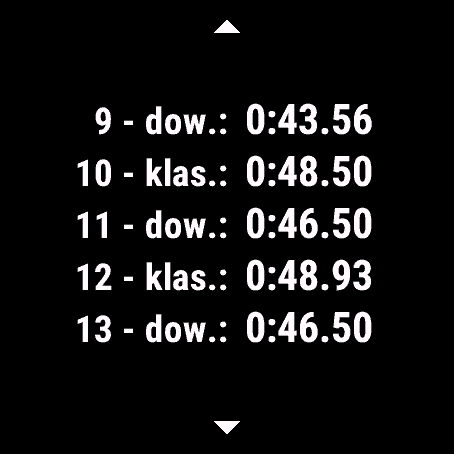
    This is the same data, but viewed on the watch. Strokes are labeled correctly here - Freestyle alternated with breaststroke:

    You might notice that length number and its duration aren't matching between the screenshots. This is basically the second issue - there are "phantom" lengths inserted, with distance -1 and negative tempo (as seen below). These are not visible on the watch (and that's why 9th on the watch is the 10th in the app).

    Total number of laps is also incorrect in the app, but correct in the watch (47 vs 44, the extra three are what I called "phantom", negative duration and tempo).

    This looks like the app has a problem interpreting data from the watch.

    Edit: one more note - the web version of Connect also shows correct stroke, so that issue seems to affect only the Android app. The "phantom" lengths are still there:

  • Thank you for the details. I will be sending you an email to collect additional information to have this reviewed further. 

  • Hi there. I have the exact same issue - any help much appreciated

  •  I just sent you an email requesting screenshots and some clarifying details to help with our investigation. Feel free to respond to it directly if you have any questions. Thank you so much!