google maps - black roads only

Good evening,

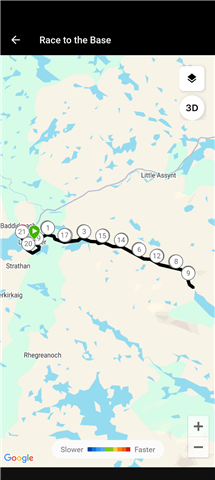
In activity detail, google maps don't screen any map ( grey screen with a grid ).

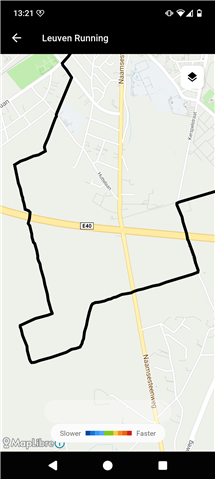
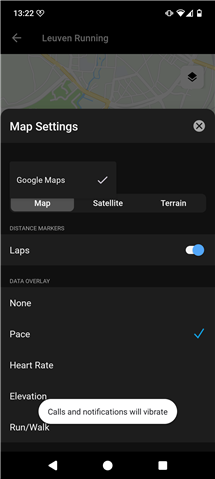
When I open the map, it appear, correctly focused, but only using black lines. Maps parameters used to screen colors according Frequency, run/walk, speed or other don't work. The road is staying fully black.

Standard Maps parameters ( plan / satellite / ground ) works.

Application revision : 5.24.1

Build Number : not screened

Android revision : 16 ( 2026-04-01 )

Thanks in advance for you help,

Kind Regards,

  • Yep. Also seeing this. I still get graduated colours selecting Mapbox, but only black using Google Maps.

  • Thanks for the post   and screenshots  .  Are you seeing this on all activity types, or just certain ones? Please let us know so we can look into this some more.

  • Thanks for your answer.

    The problem appear on all new and all old ( or very old ) activity maps ( walk and run for me ). Maps who where fine some times ago don't work at this time.

    All superposition elements ( FC, speed, walk/run... ) are impacted. Nothing work's fine.

    I suppose the problem appear since the last application update. ( I done the same test on Garmin Connect web page without any problem, but it's not the same technology ).

    Maybe a technical way : why not take a look to geometry feature ( LineString ? ) pushed to maps. If it have any error on the json datas ( geoJSON ? ), line/dot styles are ignored and maps application draw no styled lines ( not the default style ( grey / blue ) , but no style ( black ) ).

    Here the first page when you open an activity ( grey maps with grid ) :

    activity first page

    And the map using walk / run filter + laps :

    maps run walk

    Many thanks for your help.

    King regards

  • Seems to be ALL activity types, including activities that were previously showing OK. 

    Activities in my News Feed recorded by others show the same problem. 

    App build is 5.24.1 and I'm on Android 16.

  • I am experiencing the same issue on my Fairphone 6.

    Operating system: /e/OS 3.7.3-a15-20260506618655-official-FP6

    Android version: 15

    Application revision: 5.24.1

    Micro-g version: 0.3.13.250932-27

    I know that this is not the standard configuration as micro g implements the google maps API and uses MapLibre but given that the issue is exactly the same, I report it just for context. Also, I am not able to select Mapbox or Maplibre in my settings. Not sure if this is expected.

  • Hi, 

    Since a week, maybe two weeks ago, i can't see the map in the activity - it shows just blank. If i drill down to the activity, I can see black route and not the speed/colored one.

    I have Fenix 8 Amoled 51mm, sw 21.39

  •     I'll be reaching out via email to gather some additional information from you all to add to an investigation ticket. Please make sure to bookmark this thread for updates. 

  • I was about to send you the logs from my app, went in to check todays activity, and found that it was showing in glorious technicolour, using both Mapbox and Google Maps. 

    I then checked the activity I'd psted in the screenshots above and it is also now in colour. 

    The issue therefore appears to have been resolved (for me at least). 

    Do you still want me to send any more information from my app?

  • I just sent application traces but I confirm that the problem was solved at Thursday morning ( I sent a reply here that fall in spam ).

    I don't think you found any problem on Garmin Connect application ( user side ). The problem may be located to the Garmin server that send datas to google API ( server side ).

    I fact, Garmin connect app only size and screen a google object that is directly set from Garmin central server, using google API. As soon this object is set, Garmin app have no other action about screening, only Garmin server send datas to google API to alter map datas ( change colors for example ). All other natives options ( maps style, zoom .. ) are directly set from google object without Garmin exchanges.

    The maps preview is not correctly screened and road appeared for a second when you click on it ( to go to the full view ). I think the geoJSON dataset sent to google API have a mistake.

    On full screened map, colors are not set, but colors detail is send to google API ( from garmin server ) using this same geoJSON dataset. If this JSON array have any mistake ( bad geometry or false LineString definition for example ), maps screening failed.

    I checked some FIT files, all datas are right. there is no problem to collect datas from watch to GC app and from GC app to Garmin server -> no data is loosed, no data present any mistake. Note that google maps bject is right using Garmin Connect Web site ( same datas, but not the same google API access ).

    The problem is solved since Thursday for me. I suppose Garmin engineers made some changes on Garmin server used for France. If I right, I confirm it's good.

    Many thanks for your help.

    Kind regards,