"Battery status of Garmin Device" Feature request in GC

Hi, 

is it possible to add the device's battery percentage in the GC , the FIT files contain the battery levels so very easy to display it . Especially it is helpful for Edge users, it is usually on the bike ,maybe in a shed or far from the user and lets say, in bed, after wake up for example, the user will be able to check do they need to charge it or not for that day. 

And any alert for user (especially for the x50 series) would be helpful below a given % in GC, because lots of flat batteries rides happen...


thx 

Andras

Top Replies

All Replies

  • Interesting idea,  ! Please send it to our design team for review and consideration for possible future use: https://garmin.com/ideas

  • add the device's battery percentage in the GC

    On Garmin Connect android ver 5.22 remaining battery percentage for my epix can be viewed by tapping on the device in the top/right corner.

  • Well, I have 5.22 and I don''t get battery. Venu2, Edge 830, Vivosmart 4, Vivosmart 5 connected. None show battery status.

    And I would bet the device has to be turned on to see any battery status. I don't keep my Edge turned on 24/7 and I don't thenk the OP does either. That would really drain the battery.

  • You are correct. Thanks for pointing that out. I also have a very old 920XT. Shows connected, but no battery status. And my epix needs to be powered on with Bluetooth enabled in order to see the battery status. I don't own any edge devices, so cannot speak to those.

    As for non-edge devices, or other watches, there is no official compatibility list or any Garmin support documentation that I could find. I just happened to stumble upon this after seeing it on reddit.

  • And I would bet the device has to be turned on to see any battery status. I don't keep my Edge turned on 24/7 and I don't thenk the OP does either. That would really drain the battery.

    Yes, the device must be connected, because when not connected it is unknown whether the device is on (and consuming power) or off, and if Connect showed just the last known battery level, it would trigger an avalanche of complaints from people blaming Garmin that it shows false information.

    However, if the last known battery level after completing an activity, is sufficient (and apparently it is what you'd like for your Edge), there is a workaround available - install a simple Data Field CIQ app recording the battery level and displaying it in Garmin Connect. Garmin already does this natively for certain sensors (for example HRM 600).

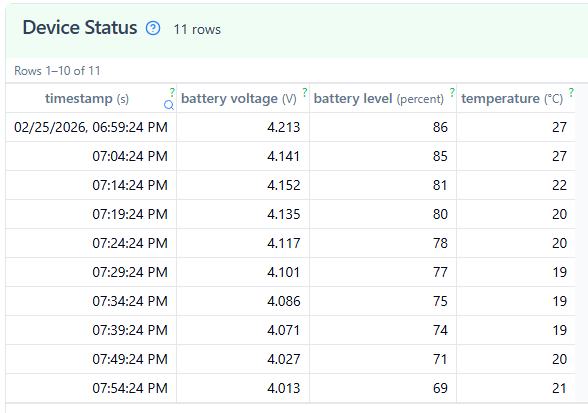
    In fact, the battery level is already available in the activity FIT file, in the section Device Status, when you open the file with fitfileviewer.com  So, that is another workaround, if you need to check the status of a device after the last activity. Though, I am not sure whether older devices record this data into the activity file too (I checked it with my Instinct 3).

    Since the data is already in the files, I bet Garmin will add it to Connect sooner or later anyway, but if numerous users suggest it to them through their Ideas form, it may help giving it some priority.

  • I just look at my Edge before sutting it off to see if I need to charge it for the next day.
    In fact I have a data field on the second screen that I can swipe and see the charge of the device and the Varia device. Easy. If I don't plan on using it for a couple of days then I take it inside to charge before the next ride.

    As for my watch, I just turn my wrist and look at the screen to see the battery state.

    Can't see taking all those extra steps that make me more dependent on Connect.