This discussion has been locked.
You can no longer post new replies to this discussion. If you have a question you can start a new discussion

Incident Map Data

Hello, I was in a bicycling accident where I sustained a concussion and have no recall of the accident or subsequent few hours.  (I'm doing OK now.)  I'm trying to piece together what happened.

My Garmin Vivoactive 4 detected the incident and recorded my movements until being reset at the hospital.  The map shows me wandering aimlessly for a while before a straight line to the hospital I was taken to. 
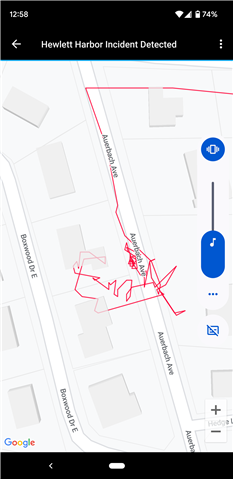
I'd like to understand how fast I was "wandering", i.e., if I was walking dazed, urgently trying to get help, or fleeing something.

Does anyone know if Connect incident map waypoints are a) downloadable in a raw data form, and b) timestamped?

Some of the actual map waypoints don't look quite right, as they show me crossing a 4' fence (which I don't think I was capable of at the time) and even entering a house (not mentioned on the police reports).  They're off by far more than the 2 meter GPS user ranger error.  Is the VivoActive 4 known to chart a false path for other reasons (weak signal...)

Top Replies

  • Does anyone know if Connect incident map waypoints are a) downloadable in a raw data form, and b) timestamped?

    Yes, they are. The simplest way to see them, is by exporting your activity in…

All Replies

  • Does anyone know if Connect incident map waypoints are a) downloadable in a raw data form, and b) timestamped?

    Yes, they are. The simplest way to see them, is by exporting your activity in the GPX or TCX format. You can the open the file in a text editor and see the coordinates. And perhaps even simpler is opening the activity in Garmin Connect Web, hovering the mouse over one of the graphs below the map - in the mouse-over tooltip there is the time since start, and in the same time the current position at given time is shown on the map too.

    Some of the actual map waypoints don't look quite right,

    That's called the "GPS drift". The accuracy of GPS position on Garmin watches is +/- 3m under ideal conditions. The accuracy is much worse, if only part of the sky is visible - i.e. in urban environment, near buildings, under trees, in valleys, etc. As the satellites move, the detected position continuously drifts in random directions. 

    GPS Drift and Environmental Factor Impact on GPS Accuracy | Garmin Customer Support

    Wishing quick and full recovery!

  • Thank you for that info trux, much appreciated.  I wasn't aware of the Garmin Connect web option.

    I'd thought that GPS did better than +-15m (https://www.gps.gov/systems/gps/performance/accuracy/) but if this is known behavior I'll go with that.

    Downloading the datapoints might only give me more insight into the drift.

  • I'd thought that GPS did better than +-15m

    Yes, +/- 3m under ideal conditions, but if you look up the topic of GPS accuracy online, the accuracy of +/- 15m is more realistic, especially in urban environment (except with expensive handheld devices, or with military tools).

  • The timestamps from the Connect Website proved helpful.  The majority of the time before the ambulance ride was spent in the thick cluster near the incident origin.  I guess the slow movement there is GPS drift, pacing about, or both.  Then comes the really wild part, but after seven minutes of that I'm on my way to the hospital at 25mph.  So the wild part is probably the time the ambulance folks are prepping me for the trip.

    There are no waypoints for almost all of the ambulance ride, so presumably GPS couldn't penetrate the ambulance body.  I'm guessing now that the wild part is spotty GPS reception while I'm being cared for in the ambulance with the door open, resulting in spotty GPS reception.

  • Yes, it sounds like a reasonable analysis