This discussion has been locked.
You can no longer post new replies to this discussion. If you have a question you can start a new discussion

Missing miles

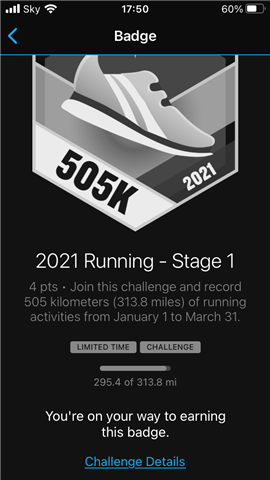
Garmin tells me I’ve ran 307.6 miles so far this year yet only 299.4 miles are counting towards the 2021 challenge. The discrepancy varies regularly from 1.4 to 8.2 miles short. I’ve updated everything and synced to my pc to no avail. 

Top Replies

All Replies

  • What does "Garmin tells" mean? Is it your watch, the app, which report?

    Have you checked the report "Progress Summary"?

    [https://connect.garmin.com/modern/progress-summary]

    Select to show "This Year" and the activity type you like to get the report for.

  • Either you do not look at the right report, and in that case do as suggests to get the right totals. Another possibility is that one of the runs in your sum was a manual entry or an imported run. Manual and imported activites do not count towards Challenges.

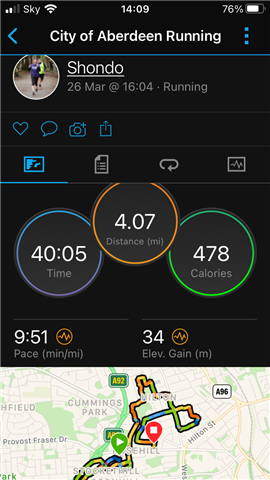
  • Done as suggested, app on pc and phone both show 307.6 miles ran. These 2 photos were taken either side of a 4 mile run uploaded as usual and yet only added 3.2m to the challenge?

  • Could you share a link to the 4 miles run?

  • Sorry I can’t seem to share the link

  • Sorry I can’t seem to share the lin

    Either click the Share symbol on the app screen (the one right of the camera symbol), and select Share as Weblink, or open the Activity in Garmin Connect Web, and share it from there, or post the address line of that page (you'll need to make the Activity visible to Everyone by selecting the respective option after clicking the padlock symbol)

  • connect.garmin.com/.../6495952031

  • OK, well, I do not see anything suspicious on the activity, except perhaps that it tells "Summary Data: Edited", though normally it is not a problem.

    In your place, I would try the following:

    1. Note the miles the Challenge reports now.
    2. Start a dummy Run activity (no need to go out, just do it at the desk), after a few seconds stop, and save it. Sync the watch.
    3. Verify that the distance of the dummy run is zero, and check again the challenge counter
    4. Now edit the distance of the dummy run and make it 1 mile. Verify the challenge counter whether it added the full mile, or not. If not, note exactly the distance it added
    5. Repeat the step #4 - edit the distance of the same activity to 2, 3, 4, 5 and 10 miles, and observe whether the counter adds the exact distance, if not, note the values to find out whether it adds the distance decrease by the same coefficient.

    When you find out, post the result here. If the distance is always reduced, then you'll probably have to contact the Customer Support and have them investigating it. If so, please then post the conclusion here, for others who should encounter the same problem.