This discussion has been locked.
You can no longer post new replies to this discussion. If you have a question you can start a new discussion

Which HRM was used?

Is there a way to see which HRM was used in an activity in garmin connect app / web? I always wear Fenix 5s and for some activities I also put on a Garmin chest strap for better accuracy. The two sync up and Fenix seems to be showing readings from the chest strap. I recently started to have issues with the chest strap (inaccurate readings) and wanted to look back at my old activities to confirm, however, I do not remember for which activities I used the chest strap and for which I only used the watch and was hoping there would be a straightforward way to tell from the record...Any advice?

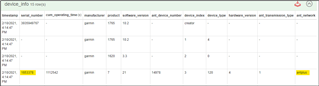
  • You can upload the fit file and view it here - FIT File Viewer

    Then look at the section "device_info"

    My active HRM is using ANT+ highlighted below

  • You can also find the list of sensors used in an actvity, in JSON format, with the help of the following URL (replace the numeric activity ID with the ID of your activity found in the address line of the activity page):

    connect.garmin.com/modern/proxy/activity-service/activity/123456789123

    Then search in the results for the section sensors, it will show something in this form:

    {sku: "006-B3126-00", softwareVersion: 7}
    {sku: "006-B3126-00", localDeviceType: "BAROMETER", softwareVersion: 7}
    {sku: "006-B3750-00", localDeviceType: "GPS", softwareVersion: 2.6}
    {localDeviceType: "ACCELEROMETER", softwareVersion: 249.56}
    {localDeviceType: "WHR", softwareVersion: 3.32}
    {sku: "006-B3127-00", localDeviceType: "SENSOR_HUB", softwareVersion: 1.4}

    If you have no viewer for "beautifying" the JSON output, you can use for example the online JSON viewer.