I've tried using online tools available, but no cigar. I'd normally suck it up, but I really need this one. I'd be super grateful if anyone can help.
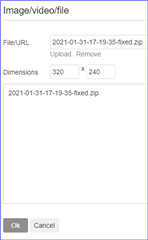
Also I may be an idiot, but I can't see how to upload / attach the file to this message....
I've tried using online tools available, but no cigar. I'd normally suck it up, but I really need this one. I'd be super grateful if anyone can help.
Also I may be an idiot, but I can't see how to upload / attach the file to this message....
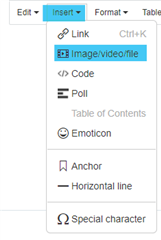
but I can't see how to upload / attach the file to this message....
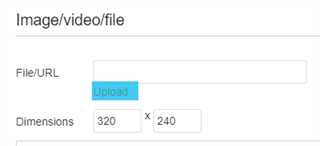


If that doesn't work for you, share the fit file using a cloud sharing service, such as Microsoft OneDrive, Google Drive, DropBox, etc.
Or just send me a private message and we'll work it out over email attachment.
This will work for you - B26D5212-fixed.zip
Unzip the file then import into Garmin Connect using the import data page - [ https://connect.garmin.com/modern/import-data ]
Repaired using Fit File Repair Tool.
Some tips to help minimize the occurrence of corrupt fit files:
Hi again - quick advice. It looks like a recurring issue. Just had the same issue with a new file.
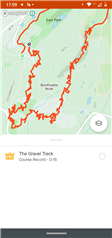
I've managed to fix it using the Fit File Repair Tool. Data is fine but the track looks CRAZY - I guess it's incorporated too many GPS pings or something? It's all over the place.
For the short term, I'd like to know how to avoid this if possible.
Don't see it in the manual, but you achieved it. Can you advise please?
Then maybe time for a new watch soon... 3 years of various annoying glitches with this one :-(
Thanks!!
Don't see it in the manual, but you achieved it. Can you advise please?
If you're referring to my tips mentioned above. Just personal experience as well as input from other forum members, especially JoeD. Noted that the low-end Garmin fitness watches (25,30,35) also have low-end processors and limited memory that are incapable of keeping up with some of the demands.
See thread and answer in the Forerunner 30/35 forum - Corrupt FIT file (again) - Forerunner 30/35
Then maybe time for a new watch soon.
Almost any other watch in the current Garmin lineup will be better. If my experience with fixing a lot of fit files is worth anything, stay away from the Forerunner 30/35, Venu, and Venu Sq.
Thanks for the tips on future watches. Much appreciated and useful for my shopping tomorrow.
I actually meant, is there a way to smooth out the data when I fix the file using the Fit File Repair Tool , so it doesn't look like this? Clearly something gone crazy with the second half of the run.

I've managed to fix it using the Fit File Repair Tool. Data is fine but the track looks CRAZY - I guess it's incorporated too many GPS pings or something? It's all over the place.
In addition to what seilogramp wrote - the GPS keypoints all over the place may be caused by the data corruption, but it could be also the sign of the ephemeris data being expired. Check out the following document for a fix: Expired EPO on a Garmin Outdoor Watch