This discussion has been locked.
You can no longer post new replies to this discussion. If you have a question you can start a new discussion

Step count stops at 2230 in Connect

I have a 920XT which has worked well for years and has been kept up to date with updates. Recently I noticed that any steps past the time of around 2200 appear on my watch but not on Garmin Connect. It will "stop the count" at aroudn 2200. The watch will show several thousand extra steps if I go for a night run at around 2330, but the app (mobile or desktop) will not count them. I have tried changing my sleep times in the app but to no avail. Anyone experienced this? thanks

  • There are three following possibilities. The most common and the most likely reason in most cases is the #2, despite that people are always mistakenly persuaded they never created multiple accounts.

    1. Your Privacy Settings do not allow sending data to the Garmin Account (verify the option Storage & Processing), or the device is not set as the Preferred Activity Tracker (check out the Device Settings on the Garmn Connect Mobile app » Activity Tracking » Preferred Activity Tracker)

    2. When the synchronisation works (the white sync circle closes and turns green), but not all the data is appearing in your account, then it very probably means that your device is associated with multiple accounts, and a part of the data lands in the other account. It frequently happens for example when you reinstall the application, and inadvertently sign up a new account instead of signing into the original one. Follow the instructions from the support document Data is Missing from My Garmin Account After Syncing to resolve the issue.

    3. The storage (or a FIT file storing the Activity details or HR data and the steps data) is dammaged or full. Try backing up and deleting old files from the folder //GARMIN/Activity and //GARMIN/Monitor. Look up the last unsynced activities from the folder //GARMIN/Activity, and try importing them manually on the Import Data page of GC Web. If you get errors when trying to import them, try fixing the broken files by passing them through the Section Remover of FIT File Tools (without removing anything), and then importing again the repaired file(s).

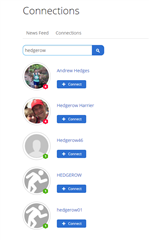
  • ... the lookup for "hedgerow" shows 5 different accounts, including the hedgerow01, which is certainly not several years old (level 1 is practically impossible at a few years old account), so it may be your second recently mistakenly created new account. Lookup hedgerow1 points to Andrew Hedges, so I guess it might your original account.