This discussion has been locked.
You can no longer post new replies to this discussion. If you have a question you can start a new discussion

Virtual Climb badge using forerunner 245

Hi All,

I've search in the forums here for help but without success.

I'm trying to nail those 4 Virtual Climb badges, either inside my house (I've 20 stairs) or outside, the thing is that I'm owning the forerunner 245 and seems that 

it needs to have a barometric altimeter to be able to track floors climbed. The Forerunner 245 lacks the altimeter :(

Would appreciate any tip/ guidance how to get these badges.

Many thanks

  • One possibility might be doing the Floor Climb activity outdoors with the GPS tracking option enabled in the settings of the Floor Climb Activity profile. If your watch does not have the profile, use for example the Run Activity profile, and change it to Floor Climb later in Garmin Connect.

    Another possibility is editing the Floor Climb activity, and setting the number of floors manually.

  • Thank you trux for your prompt reply, much appreciated.


    I can do it outdoor with GPS enables, will do a "Run" workout and later on change it via the website.


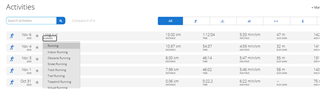
    Well, the thing is that I'm unable to find such an option in the web, what do I miss here? (see below printscreen)

    Thanks again,

  • You have to open the activity and change it there

  • Ohh, o.k.

    I will give it a try,

    Thank you

  • Hi trux, All,

    I can confirm its working and I got the badge :)

    As suggested - I've done running activity and then change it to "floor climbing" via the web site and got the badge.

    The only thing is that I lost 16 KM of running for my weekly/monthly average, because switching the activity back to "Running" will taken away your badge.