
Below - interval 1 is actually a warm up, but is marked as rest, but 200m were swam
Pool swim is zero m
Next rest is 400m
etc, etc
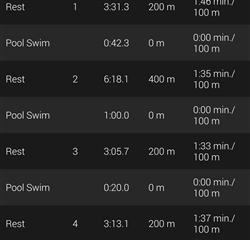
I can get around it by making the first activity a 1 second rest.
I would prefer it just read/uploaded properly though
Below - interval 1 is actually a warm up, but is marked as rest, but 200m were swam
Pool swim is zero m
Next rest is 400m
etc, etc

I can get around it by making the first activity a 1 second rest.
I would prefer it just read/uploaded properly though
I do not think this is really related to Garmin Connect Mobile. I believe the lap types are being detected by the watch, not by the phone app. You better post your comments in the respective forum dedicated to your watch model - you have a better chance to get some help there.
OK. I'll try there. I suspect its the app only because its all fine if i login online
Ah, OK, you did not mention that! It changes all. And how is it displayed directly on the watch, when you view the details of the activity there?
OK, in that case, your presence here is justified
Did you try clearing the cache of the application in Android Settings » Apps » Connect, and restarting the apllication, or better yet rebooting the phone? It may not help at all, but you always better try it before wasting time with other investigation.