This discussion has been locked.
You can no longer post new replies to this discussion. If you have a question you can start a new discussion

Forerunner 955 Spotify playlists show 0 tracks, won't sync

My Garmin Forerunner 955 used to work fine with Spotify, but sometime this year the feature broke. When I add a playlist to my library in Spotify then go to sync it with my watch it shows up with 0 tracks in it and obviously refuses to sync a playlist it believes is empty.

I've logged out of Spotify on my watch and phone, reinstalled Spotify on my watch and restarted everything but it has not helped.
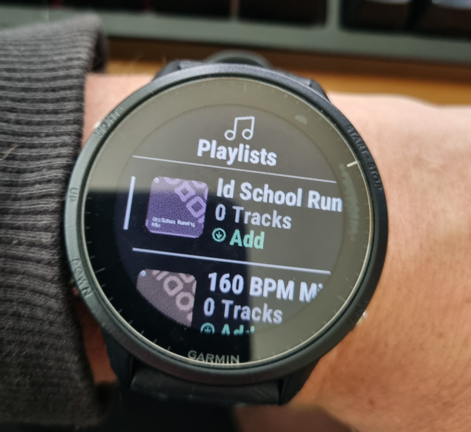
Does anyone have any suggestions to get this working again?

Thanks

  • I too am having the same issue on my 965. Great that I subscribed to Spotify today just for this Playlist for my runs that now I can't sync.... 

  • Same issue with the Tactix 7 Pro

  • Same issue Garmin Tactix 7 Pro

  • I'm having the same issue on my Epix Pro. For me, it seems to be isolated to the "made for you" playlists. I've tried moving all of the songs from the made for you playlist to a new playlist as suggested on another post but it didn't fix the problem. 

    FYI - There is a thread on Spotify's forum on the issue where a moderator posted that the issue has been relayed to their "tech teams":

    https://community.spotify.com/t5/Other-Podcasts-Partners-etc/made-for-you-playlists-not-working-on-garmin/td-p/6715145

  • Same on my Fenix 7

    A reboot of the watch did not work :-(

  • same here on Garmin Fenix 8. I only have 1 playlist, others won't sync due to " 0 tracks". Garmin, please fix this!!

  • Here's what solved my problem:

    www.reddit.com/.../

    Querida comunidad de corredores con relojes Garmin, les dejo una solución:
    Se puede copiar todos los temas de una playlist completa hacia una playlist tuya, sin tener que trasladar canción por canción como un monje medieval con paciencia infinita. Y se hace en segundos.

    Aquí van todas las formas posibles, según lo que uses.

    green circle La forma más rápida (Spotify móvil – iPhone o Android)

    Perfecta para dejar la playlist “propia” y que Garmin la reconozca mejor.

    1. Abre la playlist original (ej: Running Dance Mix).

    2. Toca los tres puntos arriba.

    3. Selecciona "Añadir a otra playlist"

      • (en algunos teléfonos aparece como "Añadir a playlist existente").

    4. Te deja elegir TU playlist.

    5. Y listo → copia TODAS las canciones de una vez.

    Gift Dato mágico: si no existe la playlist, puedes crear una nueva y automáticamente copia todos los temas

  • After trying all the suggestions in this post, the only thing that worked for me was disabling Wifi PMF in my modem settings. Im using  2.4 + 5ghz wifi. Google says "Recommendation: Keep PMF enabled for better security. Only disable it if specific devices (like smart plugs or older laptops) refuse to connect." After failing for days/hours to get sync to work, with PMF disabled, I was able to sync two 70 song playlists in less than 5 mins. Between syncs i enabled PMF again, and yes it failed to sync again. The is the first time Ive been able to add music to this phone since buying it a few years ago - phew, finally found out how to do it.