Setting up with Garmin Express sets the watch to English

I already opened this topic once here  Setting up with Garmin Express sets the watch to English but as it is locked now, the issue is still the same. Possibly it is only reproduceable if you have a  German macOS as well?

Garmin Express running on German macOS (26.7 in this case). 

I got a new watch (Fenix 8), took the initial steps to set it up with my phone and Garmin Connect. Watch is set to German.

Now I connect the watch with the Mac and add it to Garmin Express. 

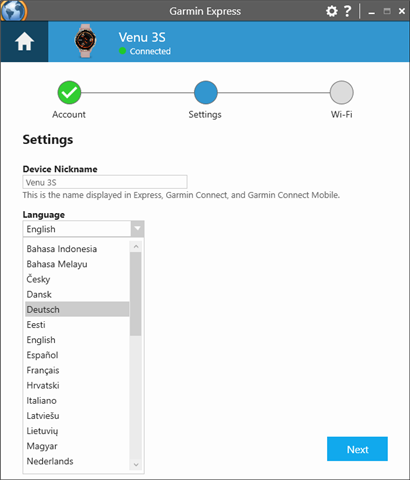
There is a language toggle, already set to German (and I leave it that way)

After connecting the watch to Garmin Express and updating the maps, I unplug the watch

-> Watch is set to English.

Maybe the language in the drop-down is set to the system language, but behind the scenes, as I didn't change the drop-down, it is set to the programmer's default, what is English.

Still as annoying as it has been years ago...

  • Can you upload a video of the watch settings showing your selected language, connecting the watch with Garmin Express and syncing the watch and what language settings show in Express, and then disconnecting the watch and what the language setting changes to on the watch? Garmin Secure File Upload

  • I experienced that more than once. Setting your language on the device and after a sync with GE it was reset to english. I found out that you can set the language for your device also in GE somewhere and if this is set to english it overrules the setting you made on the device after a sync. So set your language in GE.

  • Garmin Express is a source of confusion, mischief and inconvenience when it comes to devices that also synch with a phone.

    - GE MacOS re-arranges my glances and apps every time I plug in

    - It fails to recognise when an update has happened via Garmin Connect Mobile and still states that there are updates including Connect IQ apps and firmware updates.

    - Requires re-plugging the watch to clear the log of Connect IQ available app updates even when they have already been updated through GCM

    It needs re-writing.   Conveniently, there is an opportunity because Rosetta 2 support is ending.  I wonder whether the opportunity will be grasped?

  • To do this you will need to first remove your watch then add it back to access the necessary language setting. After re-adding the watch to Garmin Express, ensure 'Deutsch' is chosen under the Language drop down. 

  • I think Garmin wants to get rid of GE and only focus on GCM an also confusing and overly complicated piece of software with a lot of issues. I use/like GE for fast(er) map updates and a source that always uploads my rides when GCM has one of his/her days with wifi and/or BT problems.