This discussion has been locked.
You can no longer post new replies to this discussion. If you have a question you can start a new discussion

Garmin Express (Mac) and Fenix 9 problem

Hi guys,

I'm having a problem with Garmin Express on Mac and my new Fenix 9 Pro.

Quick background on my setup: I've been using Garmin Express on Mac for a long time with my Epix Pro Gen 2 and my Edge 1050, and everything works flawlessly there, sync included.

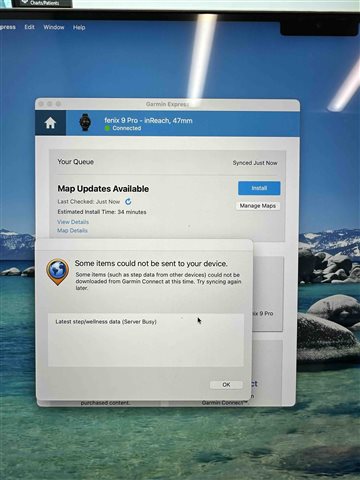
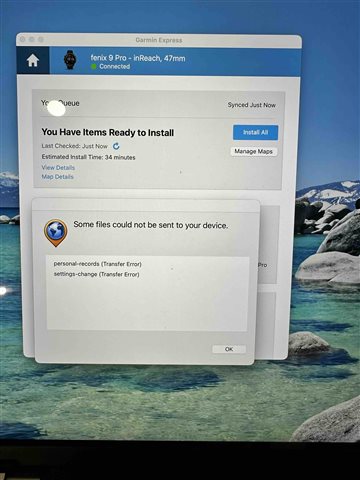
However, when I connect my new Fenix 9 to the Mac, communication between the Mac and the watch (and vice versa) doesn't work. I can log the watch into Garmin Express and it does show up as connected (green dot). But right after the watch is detected, an error message appears saying content can't be synced — for example the records file or golf courses.

The real issue, though, is with the maps. When I switch to the Maps tab in Garmin Express, not a single map is checked as installed, it looks as if there's no map on the watch at all (but there are). If I select a new map to install, the download itself runs, but it aborts at 50% (this seems to be where transfer to the watch begins). It doesn't matter which map, already-installed ones or brand-new ones, none of them work.

Switching to a Windows PC, everything works fine: sync, installed maps show up correctly with a checkmark, and installing new maps works without any issues.

Back on the Mac: same error again. As mentioned, the old Epix and the Edge work fine on the Mac under this exact same setup.

So far I've tried a number of things without success: I fully uninstalled and reinstalled Garmin Express multiple times, including clearing the cache folders in ~/Library/Application Support/Garmin and ~/Library/Caches. I confirmed Rosetta 2 is installed, and I also granted Garmin Express full disk access.

I've also reset the watch to factory settings multiple times without any improvement, and I tried Garmin Express under a different user account on the same Mac — same error occurs.

Can anyone help, or does someone have an idea what might be causing this?

Thanks,
Dirk

  • yup. cannot use ge with the f9pro

  • I have exactly the same problem as Chris with my new Fenix 9 Pro and macOS 27. The Music, Apps, Tools & Content, and Garmin Connect buttons are not working…

  • Same issues as most users in this page. Syncing issues with maps, personal records, etc. 
    I use Mac, but also tried with PC. 
    I already found a way around, but is really slow, complicated, and not practical. 

  • Same issue here.  Upgraded from Fenix 8 to Fenix 9 Pro.  Multiple issues:
    1) Garmin express running on MacOS Tahoe 26.6.2 will not properly sync nor update maps for Fenix 9 Pro.  Garmin Express works fine in all respects for all my other devices, including Fenix 8 and Edge 1050.  With Fenix 9 maps load to 50% and then Garmin Express crashes and fails to update.  Also displays sync errors.  Uninstalled and reinstalled Garmin Express including deleting all cache files, and unpaired and repaired devices to Garmin Express--no effect on problem.
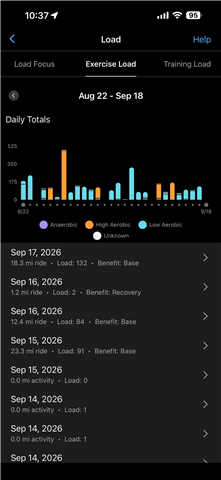
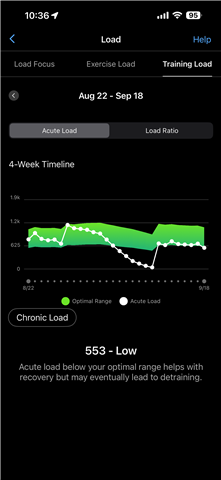
    2) Garmin Connect sync issues.  When I set up Fenix 9 Pro I transferred settings from Fenix 8 via Garmin instructions from backup.  Now whenever Fenix 9 pro is used as primary wearable, any activity recorded and pushed to Garmin Connect cloud--including activities recorded either on Fenix 9 Pro or on Edge 1050--do not accrue properly to acute load, load balance, or other training metrics.  When I go back to Fenix 8 and set it as primary wearable and turn Fenix 9 Pro off, all data syncing from all devices to Garmin Connect goes back to normal.  Pairing/unpairing, resetting, and factory resetting Fenix 9 Pro doesn't seem to solve the issue.  Attached photos show screenshots of the time period when I wore Fenix 9 Pro from September 3 - September 10.  My actual training was uninterrupted during those dates, and individual workout activities were recorded and display on exercise load graph, but those activities did not properly accrue to training load and load focus and threw off training readiness.  On September 11 I deactivated Fenix 9 Pro and went back to Fenix 8 and data recording normalized and accrued properly to training load in Garmin Connect from all devices including Edge 1050.  Clearly Fenix 9 Pro is causing some syncing problem where when set as primary wearable, activities recorded either on it or on Edge 1050 are not accruing properly to training load and training readiness streams on Garmin Connect.
  • Same issues as most users in this page. Syncing issues with maps, personal records, etc. 
    I use Mac, but also tried with PC. 
    I already found a way around, but is really slow, complicated, and not practical. 

  • Same for me.
    I've tried full resets of everything, nothing fixes the issue.

  • Thank you to everyone who responded to my previous message. I have sent an email to those experiencing these error messages on their Mac when attempting to use Garmin Express with their fenix 9 to collect some additional information. 

    You may bookmark this thread as we will post any updates here.

  •    I didn't receive any mail though I am affected. Thanks.

  • I don’t receive any emails