This discussion has been locked.
You can no longer post new replies to this discussion. If you have a question you can start a new discussion

Garmin Express (Mac) and Fenix 9 problem

Hi guys,

I'm having a problem with Garmin Express on Mac and my new Fenix 9 Pro.

Quick background on my setup: I've been using Garmin Express on Mac for a long time with my Epix Pro Gen 2 and my Edge 1050, and everything works flawlessly there, sync included.

However, when I connect my new Fenix 9 to the Mac, communication between the Mac and the watch (and vice versa) doesn't work. I can log the watch into Garmin Express and it does show up as connected (green dot). But right after the watch is detected, an error message appears saying content can't be synced — for example the records file or golf courses.

The real issue, though, is with the maps. When I switch to the Maps tab in Garmin Express, not a single map is checked as installed, it looks as if there's no map on the watch at all (but there are). If I select a new map to install, the download itself runs, but it aborts at 50% (this seems to be where transfer to the watch begins). It doesn't matter which map, already-installed ones or brand-new ones, none of them work.

Switching to a Windows PC, everything works fine: sync, installed maps show up correctly with a checkmark, and installing new maps works without any issues.

Back on the Mac: same error again. As mentioned, the old Epix and the Edge work fine on the Mac under this exact same setup.

So far I've tried a number of things without success: I fully uninstalled and reinstalled Garmin Express multiple times, including clearing the cache folders in ~/Library/Application Support/Garmin and ~/Library/Caches. I confirmed Rosetta 2 is installed, and I also granted Garmin Express full disk access.

I've also reset the watch to factory settings multiple times without any improvement, and I tried Garmin Express under a different user account on the same Mac — same error occurs.

Can anyone help, or does someone have an idea what might be causing this?

Thanks,
Dirk

  • The app NOT working isn't an issue here in this specific thread. The app has been working fine for me for the past 2+ years on my Apple M2 with previously macOS Sequoia and now macOS Tahoe without any issues or errors. Likewise, I can update my Fenix 8 with no problems.

    The issue is with GE not working with Fenix 9 Pro with the exact same setup.

    I believe it's the same exact situation with seagers.

    It has been more than 8 days now and there's no solution on this issue from Garmin. I planned to use my new Fenix 9 Pro Solar on my upcoming summit for a week, starting coming Sunday. Looks like I'd need to drop my plans and just continue with Fenix 8. Bummer. 

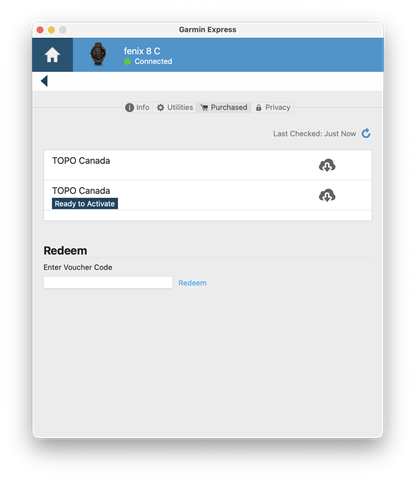
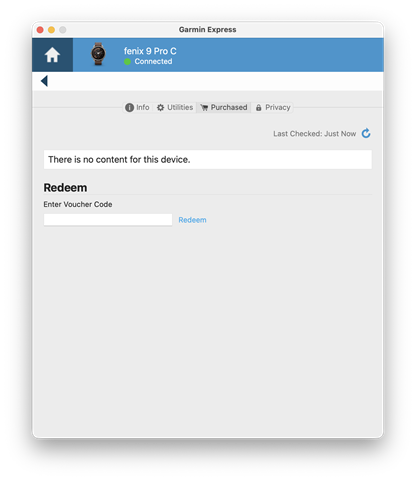
  • Same here. Plus, purchased TOPO maps from garmin.com do not even show up. See attached screenshots: One is when my old Fenix 8 is connected, one is with the new Fenix 9 Pro. Is there a timeline, when Garmin Express on Mac will support the Fenix 9?

  • Plus, purchased TOPO maps from garmin.com do not even show up. See attached screenshots: One is when my old Fenix 8

    Did you make an additional separate purchase of the same Canadian Topo maps from Garmin for the newer Fenix 9?. These downloadable content maps are only good for one unit per purchase.

    If you are trying to use the purchase from the Fenix 8 on the Fenix 9 with only the one, original purchase, this is where the problem may be.

  • The problem is the connection of the watch with GE. This is a Fenix 9 issue not a problem with a single watch licenced map. It fails at the point when GE tries to communicate with the watch

  • Absolutely. On the Fenix 8 screenshot, the first entry is the TOPO map altready installed on that watch. That's why it doesn't have an "activate" label. The second entry on that screenshot is the map I purchased for the Fenix 9. It's not a licensing issue, but a Garmin Express problem.

  • I just got my new fenix pro 9 inreach in, and as soon as i want to ad it to express it chrashes , so i can not even ad it to express Disappointed

  • Tengo el mismo problema desde el primer día. Me dicen en Garmin España, que es cosa del, reloj, del cable, o del Mac.

    He puesto al agente que me atendió por correo a parir en las reseñas.

  • Same problem here. Cannot install or manage maps.

  • Same here.  And what's even better is that after migrating from Fenix 8 to Fenix 9 Pro, after 7 days it also started to not sync all my true up and acute load data, so the core functionality of having the watch in the first place is bricked.  All load calculations, training readiness, and other downstream metrics are broken.

  • Hey  Any chance this will be fixed soon? Thanks.