I'm finding it impossible to update my GPS.

This has been a ridiculous experience.  Installing Garmin Express on Windows 11 causes a problem. I want to install Net Framework but for some reason it can't. It doesn't tell me why or what might happen without it. Garmin does install, but Net Framework doesn't. Maybe that's the problem - I dunno.  Garmon express runs, sees my device and is "Step 1 of 2: Preparing Device for Software Update. This may take a minute" The minutes has gone on for 2 hours. No end in sight. Why is this so difficult?

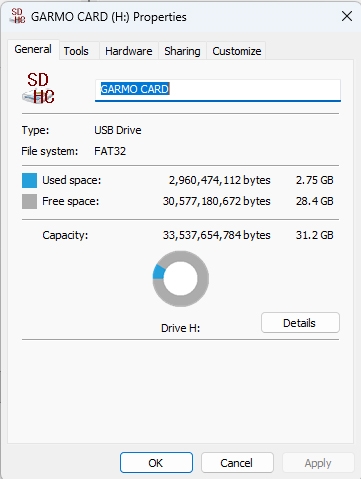
  • I too was having same problem, so i followed the link that JohnfromPA  provided and added ALL of the features for .NET framework 3.5 on Windows 11.  After rebooting computer, and trying Garmin Express again, that got me past the Software Update and one of the other two updates (forget exact name, but it was fairly small and included "Text" as part of its name).  Now I am trying to Update Map, and seem to be stuck in the same type of Step 1 as before.  Any suggestions on how to get the Map to actually upload?  I do have a blank 32GB micro SD card installed, so the 5.0 GB map of North America should easily fit on that.  Prior to installing the 32GB card, I was using an 8GB microSD card, which I forgot to remove before opening the case to replace the battery.  That damaged the card, and now I can only access the Mexico and Canada maps.  Any and all suggestions welcome!

  •  I don't know anything about putting maps on SD cards but do know that the SD card must be formatted as FAT32 so confirm that it is.

  • Thanks for your reply.  Yes, the microSD card is formatted as FAT32.  If I understand how Garmin is supposed to work, if any file is too large to fit on the 2 GB internal memory, then it uses the inserted card.  In my case, apparently the US portion of the North America map was on the microSD card that I damaged, and Mexico and Canada were on the internal memory.

  • What worked for me was to uninstall Garmin Express, and then install Net framework 3.5 from the Microsoft link  https://www.microsoft.com/en-us/download/details.aspx?id=21. Then I reinstalled Garmin Express and it updated fine. Net framework 3.5 would not install from the Garmin Express installation, but installed fine on its own. Thanks to all for the help.

  • You have given me new hope.  My computer is fairly new (bought 2 years ago), came with Windows 11, and when I look at Windows Features, it already has Net framework 3.5.  Do I need to uninstall my current Net framework 3.5 and then download/install again?  To the best of my knowledge, all operating software is up to date.  UPDATE:  I found the v3.5 folder.  Do I need to delete it then install the latest version?  I don't have an accessibilty.dll file in that folder to tell me it's date.  I do have other version folders, such as v1.0.3705, v1.1.4322, v2.0.50727, v3.0, v3.5, and v4.0.30319  The two v1 versions were last modified on 1/20/2025.  The other 4 show more recent dates, all different, from when I stated this attempt to update my Garmin on 4/12/2026.

  • I am running Windows 11 25H2.  When I installed Garmin Express I did not install .NET.  When I look at installed programs, .NET is not listed yet Garmin Express seems to be functioning as expected although I use it for is keeping my zumo XT up to date.  I don't know what to make of that, but I believe that if .NET Framework 3.5 is installed on your system then you should not need to do anything beyond installing Garmin Express.

  • Microsoft has a .NET Repair tool that might be worth using.  It can be downloaded from .NET Repair Tool

  • Thanks for your suggestion, but it did not change anything.