csv

in the activity download, the times are are displayed in a strange structure. like this,  how can I get the total minutes per activity?

Row Labels2025-08-05 8:322025-08-12 10:002025-08-13 12:372025-08-15 16:312025-08-16 9:202025-08-18 12:042025-08-19 16:312025-08-20 12:012025-08-21 9:592025-08-22 9:532025-08-23 9:14

Treadmill Running 0.039895833 0.025787037 0.017893519 0.019733796 0.018634259 0.032453704 0.009849537 0.022407407 0.041122685 0.02337963 0.012546296 0.020694444
  • What program are you using to open the CSV? It should display correctly in Notepad, Notepad++, or Excel. The numbers shown (e.g., 0.039895833) represent fractions of a 24-hour day, not minutes. You can use Excel to convert these values to minutes by multiplying them by 1440.

    0.039895833 x 1440 = 57.45

    .45 = 27 seconds

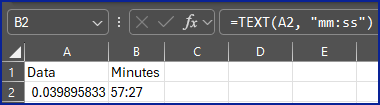
    So 57:27 is the result

    Or to do it in 1 formula, assuming A1 contains the first value 0.039895833 and you want the minutes/seconds in B1.

    Put the formula =TEXT(A1, "mm:ss") into B1

    Also, you posted in the Garmin Express forum, which is not related to your issue and could limit the number of responses you receive. You should probably post in the Garmin Connect Web forum instead.