This discussion has been locked.
You can no longer post new replies to this discussion. If you have a question you can start a new discussion

Forerunner 970 – Missing Music Upload Option in Garmin Express

I’m unable to upload music to my Garmin Forerunner 970. The watch syncs fine with Garmin Express (Windows), but there’s no “Music” button or tab shown anywhere in the app to manage or transfer music.

Here’s what I’ve tried:

  • Latest firmware installed on the watch.

  • Latest version of Garmin Express (reinstalled twice).

  • Tried on two different PCs and USB cables.

  • Watch connects normally and syncs activities, but the “Music” section never appears.

  • The “Music” folder is also not visible when browsing the watch via File Explorer.

Could you please confirm if the Forerunner 970 supports direct music transfer, or if this is a bug in Garmin Express?

  • Isom, thanks for the post. We'll need to gather some additional info to better assist with this. I've just sent you an email, so please be on the lookout for that. 

  • I have the same issue.
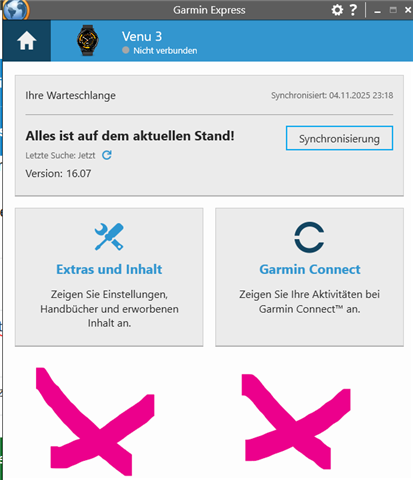
    On the Garmin Express I see "Tools & Content" and "Garmin Connect".
    I have Forerunner 970 too

  • Venu 3 has the same problem. You cannot download music to the smartwatch via Garmin Express because the fields are no longer available.

  • Hi Eveline,
    I solved the issue by simply reverting to the old version of Garmin Express. It completely solved the issue, and it's working perfectly now Slight smile
    That's the version working for me (I'm a Windows User. If you have Mac maybe it'll work for you too through the Mac menu):
    1. Go to the Garmin Express download page
    https://www.garmin.com/en-US/software/express/windows/
    2. Press the "System Requirements"
    3. At the 5th (and last) point, you have an option "download version 7 of Garmin Express for Windows"

    You'll need to uninstall the current version you have now on your computer (since it'll recognise you already have the application on your computer).
    BTW I have Win11. It's not an issue even though the download file is for Win7 :)

    Hope it'll work for you too

  • Thanks for the tip, but unfortunately it doesn't work for me. I followed the steps you described. The error message when installing version 7 for Windows is: Garmin Express is already installed. However, the programme does not appear in the app list.

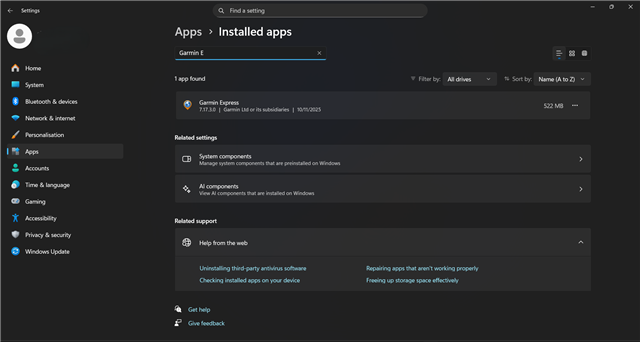
  • Go into Windows settings → Apps → Installed apps and there type in the search tab "Garmin Express". You'll see the app, and now just click at the three dots at the right side and select uninstall.


  • Unfortunately, that didn't work either. I downloaded the "Microsoft_Install_and_Uninstall" app and was able to delete Garmin Express with it.

  • Oh that is strange Thinking

    Anyway, glad to hear that it worked eventually! Slight smile