This discussion has been locked.
You can no longer post new replies to this discussion. If you have a question you can start a new discussion

Drive 51 freezes at "Software Loading"

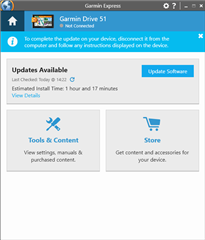
System freezes and also does not proceed past the first step of software upgrade while Garmin Express (using updated Express,  internet connection is fine, and using admin privileges) the device is unusable as it never gets past this... whether connected or not to Express.

  • If you're on Windows do you walk away while it's updating? What you describe is often caused when Windows UAC kicks in, and if you're not there to accept the UAC prompt then Express can't proceed.

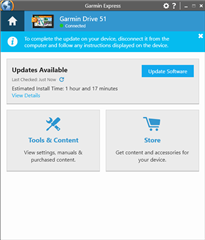
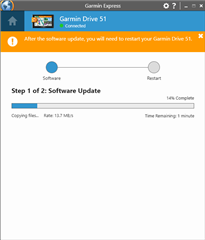
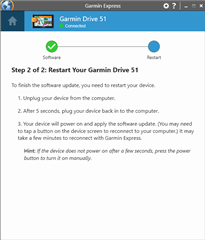
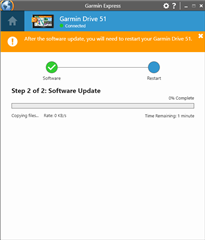
  • No I sit patiently... also note that when trying to update system software it prompts for step 1, but after completing Step one, then unplugging and replugging (as instructed), the step 2 of 2 window displays momentarily, then cycles back to back to the update window.

  • I don’t own a Drive 51 but I’m puzzled by your wording of “…unplugging and replugging (as instructed.”  I don’t ever remember getting an instruction like that with my three devices.

  • Windows occasionally has issues with mtp devices, I'd try setting your device to mass storage mode.

  • I recently helped my brother in law to get his newly purchased Garmin Drive 53 up to date with the latest map and software updated. On his device I also for the first time saw the "unplugging and replugging" instructions. Maybe it's Garmin's new way of updating their devices. 

  • Another thought: you would not have Google Drive client installed on your PC by any chance?


    I found that it's interfering with GE and I need to disable / turn it off when I connect some Garmin devices to PC/GE - otherwise they connect/disconnect all the time.

  • Thanks for taking a stab at this but...
    The problems remain; a frozen screen on startup with the message "Software Loading..."; the failure to commence the second step of the Garmin Express update routine. 
    When attempting to solve the issue, I've ensured that the Garmin device and MicroSD are recognized and accessible when connected to the computer, Admin priveleges on the computer are in effect, a fresh copy of the Garmin driver and Garmin Express are used, and direct DSL and WiFi have alternately been used during the attempt to solve the problems. 
    I have also tried (1 at a time), 2 different cables. different USB ports (2 USB-A, 1 USB-C)
    I've included the step windows from start to recycling.