Latest update completely breaks the map manager, it's gone from the interface. Reinstall / reboot pc and fenix 7 watch makes no difference.
Uninstalling and reverting back to 7.26 immediately resolves the issue.
Latest update completely breaks the map manager, it's gone from the interface. Reinstall / reboot pc and fenix 7 watch makes no difference.
Uninstalling and reverting back to 7.26 immediately resolves the issue.
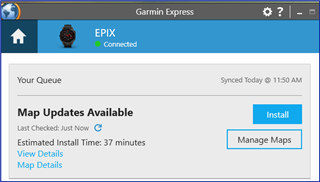
it's gone from the interface
I'm on 7.27 with my non-pro Epix (Gen 2) and can see the manage maps button.

Do you not even see this button, or is it just non-functional? Could you post a screenshot?
button "Manage Maps" completely disappeared, despite several reinstalls of the app and PC reboots.
Is the display resolution on your computer less than 1024 x 768?
Garmin Express Requirements for Mac and Windows
Suggest contacting Garmin Support directly to report the issue.
No, 2K 34" monitor/resolution
Imo, It's not a "Windows 11" issue, since 7.26 is working as expected.
Contact Garmin Support directly to report the issue. The phone number and contact options will vary depending on your region and time of day.
I've faced the exact same issue with my Fenix 7 Pro Sapphire Solar and Garmin Express 7.27 on my Win11 computer.
The maps option is missing, and I got to roll back to version 7.26, which does show the map manager.