BaseCamp 4.4.1 Is Now Available

Former Member
Former Member
BaseCamp is 4.4.1 now available and can be downloaded here:

http://www8.garmin.com/support/download_details.jsp?id=4435

This release does not support XP.

Installation of this version will overwrite your previous BaseCamp installation.

Here are the changes made in this version:
  • Added notification that eligible devices can install maps on the desktop using Garmin Express
  • Added ability to create and manage areas to avoid while routing
  • Added properties (and shading) for public land survey types
  • Added progress bar in the data list for downloading BirdsEye
  • Added progress bar on the BirdsEye wizard for downloading BirdsEye
  • Added way to activate BirdsEye subscriptions within BaseCamp
  • Added ability to go back on the BirdsEye wizard dialog and select a new area (subscription only)
  • Added option to disable imagery display in the map views
  • Added ability to mark a geocache as unattempted
  • Added some additional waypoint symbols to be more consistent with newer nuvi and zumo devices
  • Added Duplicate List and Contents menu option
  • Added a column in the data list for waypoint category name
  • Added map context menu option to search for the most recently used search category
  • Improved response time when populating the list of Birdseye providers
  • Changed how nearest area results are displayed on the map when hovering
  • Changed to ask if the waypoint should be shared between routes when splitting a route
  • Changed to preserve the settings in the print page settings dialog
  • Changed the default behavior of the 'recalculate routes to match maps on device' option. This is now only enabled by default for zumo devices.
  • Fixed problem with marine heights being displayed incorrectly
  • Fixed issues when reading GPX files that contain invalid times
  • Fixed odd rendering on newer City Navigator maps
  • Fixed issues with inconsistent track stats
  • Fixed Select All in lists not selecting the last item
  • Fixed issues when attempting to transfer data to read-only cards or fitness devices that don't accept BaseCamp generated data


Post here if you have questions.

The non-English language version of the software will be available through the in-application software update check shortly.

Please post any bugs you may find here.

Thank you all in advance for any feedback you may have.
  • Well as well as being patient let's not jump the gun ... While it's possibly a Garmin error it may turn out to be something else. A few folks reporting a problem isn't conclusive proof that BC is at fault.
  • If you are getting the Windows Registry error when trying to send data to a device use the Reset feature in BaseCamp to resolve the issue.

    1. Open BaseCamp
    2. Click Edit menu
    3. Click Options
    4. Click General icon
    5. Click Reset button

    This takes a few settings back to Default but none of the data will be lost.

    Curt
  • Former Member
    0 Former Member
    I downloaded BaseCamp 4.4.1. When an attempt is made to download a route, an error pop-up screen occurs that says "BaseCamp has encountered an error accesssing the Window's Registry. Please contact BaseCamp Support..... When you exit out of the error popup window, BaseCamp closes.

    This is on a Windows 8.1 system.

    Anyone else encountering this error, and if so, any solutions?


    Yes, I created a new route and uploaded it to my NUVI 2597, it worked fine. My wife wanted me to add another Waypoint to the trip. I opened up BaseCamp and got a message a new version, 4.4.1, was available, so I downloaded and installed it. I then proceeded to add the new WayPoint to the route. Upon completion, I went to send it to the 2597 and I got the registry error message. I then uninstalled BaseCamp, rebooted the computer, and re-installed it. It still gave me the error message. I tried it several more times and it continued to give the error message.

    I went onto work on something else, and came back to it about an hour later, and tried it again. This time it worked fine and sent the revised route to my 2597. No idea why it wouldn't work the first time, but was fine about an hour later.
  • Former Member
    0 Former Member
    Add me to the list, a couple of days ago I loaded BC to tidy up some tracks and load them onto the Montana.

    BC said update time, so did that. Subsequently, it crashed when trying to send the tracks to the device, ie Montana. Drag and drop does nothing. Everything else seems normal. I also updated the Montana firmware just in case, but still crashes. Error says can't write to registry. Export is OK, I haven't tried to import to the device which I thought about later.

    After exporting, I used my laptop, imported and without updating BC, got the job done.

    Windows 8 ver 6.3 Build 9600 FWIW.

    I reported this to Garmin, but no response as yet.
  • On another forum this has been posted:

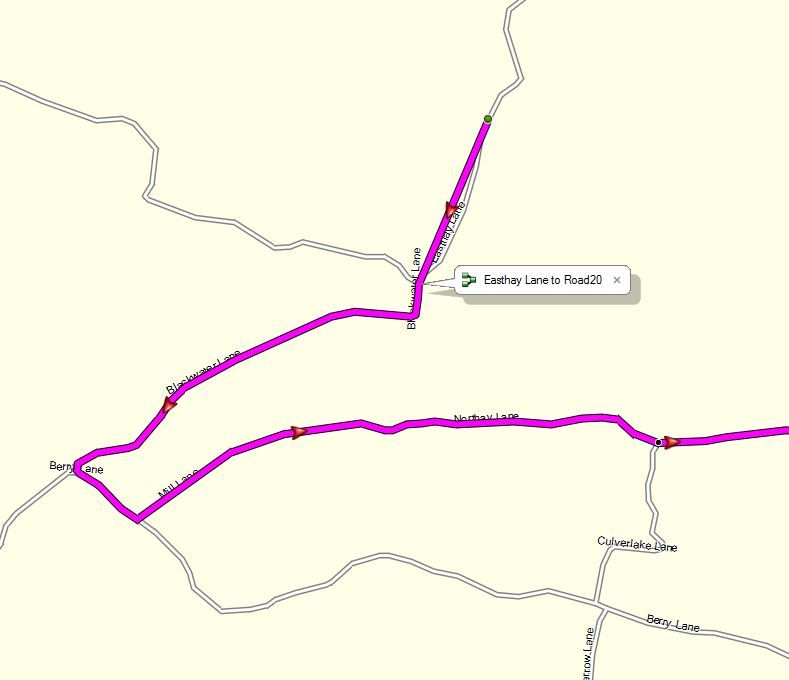
    There is a problem with this release in the way it's creating routes. If I make a new Route in a lot of cases from the first point to the next intersection it will draw a straight line. Also sometimes in the middle of a Route if I put a point on a road it will follow a straight line to the next intersection. Sometimes instead of a straight line to the intersection it will be straight to a curve in the road and then follow the road If I have a point before and after intersections and none on the section giving the problem it seems to work OK.

    That user was using the CN NA map but I can also recreate the problem with the CN EU map, so it appears there is an issue with this release of Basecamp.
  • Former Member
    0 Former Member
    No routing problems with Topo Aus/NZ, so far.
  • Yes, it's not an obvious problem as I failed to duplicate it the first time but it definitely is an issue. See this screenshot. If I send the trip to my nuvi it displays it correctly along the road, so clearly a Basecamp issue.

  • Worked for me.

    If you are getting the Windows Registry error when trying to send data to a device use the Reset feature in BaseCamp to resolve the issue.

    1. Open BaseCamp
    2. Click Edit menu
    3. Click Options
    4. Click General icon
    5. Click Reset button

    This takes a few settings back to Default but none of the data will be lost.

    Curt


    I initially got the regitry error. I then just couldn't transfer routes/tracks. Did the above and now working OK
  • Former Member
    0 Former Member
    Hi to all,
    I need a little help:

    I tried to install BC 4.4.1 version, but failed. The extractor worked 5 seconds, after this stopped at all. No Garmin processes in the task manager at all.

    And unfurtunately, after this operation the previously installed BC 4.3.5 did not work as well.
    Clean install (windows uninstall + manually deleted BC folder + reinstall from original .exe) did not help.
    No BC at all.

    Any suggestions how to solve this prob?

    config: Win 7 64 bit, i 5, 8 MB RAM
  • Former Member
    0 Former Member
    This takes a few settings back to Default but none of the data will be lost.


    I'd say this resets more than just "a few settings back to Default". It pretty much resets the whole user interface and all user preferences.

    Users may want to backup their settings beforehand. Copy this file somewhere before the Reset:

    C:\Users\<user>\AppData\Local\GARMIN_Corp\BaseCamp.exe_Url_XYZ\4.4.1.0\user.config

    where XYZ is some alphanumeric string.

    PS: Curt is correct that no user data is lost but those using custom BC database location(s) will need to point to those again since the default (and probably empty) location will be set.