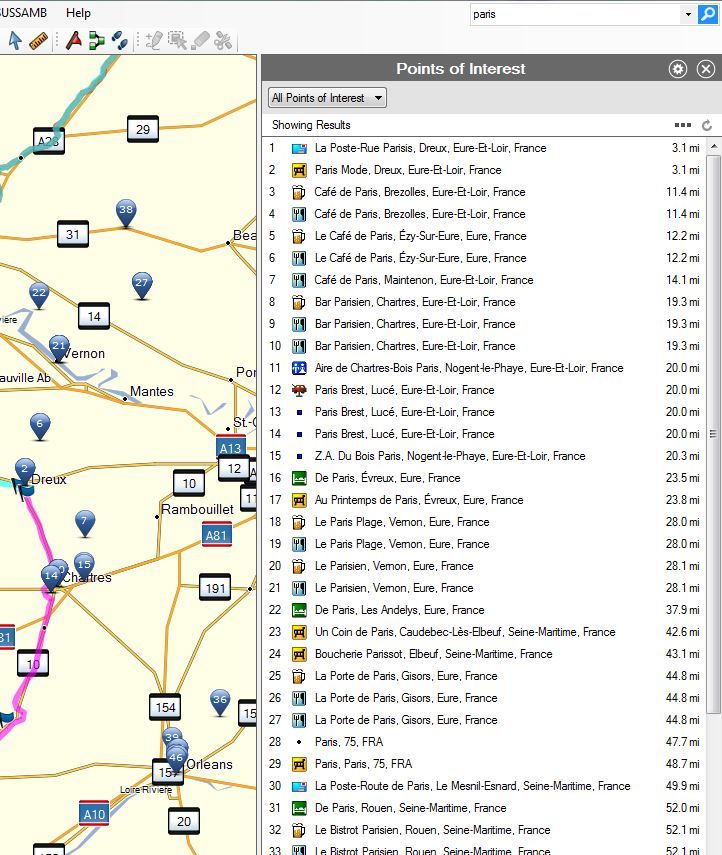
typing a city name doesn't show city in search box, only elements containing the city

I must be stupid wanting to search for a city, but sometimes one wants just to drive to the city and not any address or waypoint in that city.
So typing a city name would have as an expected result the city, but NO!
Am I doing something wrong? Only poi or addresses containing the city are shown in the results.
thx

Olivier
  • Just ensure under POI you select Cities. Why cities are under POI I have no idea, I feel they should have their own listing. So:

    Ctrl + Alt + F, select POI under Type then from the drop down list below 'More Options' select Cities. Now enter the city in the search box.
  • I'm not sure you even need to use the POIs. In Basecamp 4.3.4 and CNNT 2015.10 I can just type the city and state (e.g. "Savannah,GA") into the search box in the upper right and click the magnifying glass icon. The first result is always the city assuming it can find it. I assume the first result is the geographical center of the center but I haven't verified that. If this doesn't work for you I'm not sure what could be wrong.
    Do you have the little "Points of Interest" icon selected under the Top Results heading? In my installation the Poiints of Interest is the first little icon on the left.
  • I suspect it depends on the uniqueness or otherwise of the city name, and how close to the centre of the map it is. It certainly doesn't work that way for a few cities I've just tried, just in case the behaviour had changed with 4.3.4 ... as far as I can determine it hasn't.
  • How odd. I'm sitting here with the map centered around Charlotte, NC and just typed in Seattle, WA. BC 4.3.4 immediately slewed the map to Seattle and offered Seattle at 0 feet as the first option in the Point of Interest list.
    I can slew all around the country by just typing the city and state in the seach window in the upper right of the basecamp window. I do need to have the Points of Interest filter enabled.
    What city can you not find? I'll try it here.
  • Well I've been trying in France as an example. With the map centered on Bayeux for example I entered Paris. Only one Paris in France but lots of POIs with Paris in them ... Paris comes in at 28 in the list


  • Perhaps it's a function of our map. I'm using City Navigator North America 2015.10 and I don't have access to a European map set. I did try entering just Seattle without the state designator and that seems to trip it up. Without the state letters WA, just entering Seattle gives me a big list of things with Seattle in its name. I've gone down the list to about 50 places without finding a real Seattle city reference. So BC or the map really wants the state info as well.
    I just tried Toronto Canada with and without the ONtario suffix and it works with Toronto, ON but not with just Toronto.
    Can you try Paris,FR and see what happens?
  • That doesn't work. In any case the answer is simple enough, ensure Cities is selected. I still wish it wasn't hidden away in POIs.
  • Sounds like a bug or a bad implementation. Maybe a Garmin developer can jump in about why CNNA and European maps differ in their search ability. I never use the Cities POI because it's a pain to have to drill down that far. I agree it needs to be on a higher level but with CNNA it doesn't really matter. I know the developers are busy but sometimes I wonder why some very annoying things that would be simple to correct take so long. Persistant print options is my favorite example.
  • Well in Europe we don't have the equivalent of states, and there is no simple 2 letter code for each country. I've discovered that Paris, France works ... and this works too with places like London, England so if you want to type the country name that works :)
  • There are two letter, three letter and numeric designations for most every country on the planet. Check: http://www.worldatlas.com/aatlas/ctycodes.htm There is no reason why Garmin couldn't use them.