What is the purpose of the GeocacheLogs folder in my C:\Users\{USER}\AppData\Roaming\GARMIN\BaseCamp\Database\4.3\ directory? How are the entries in there created? (I seem to have too many, perhaps from an older Basecamp install.) Thanks.
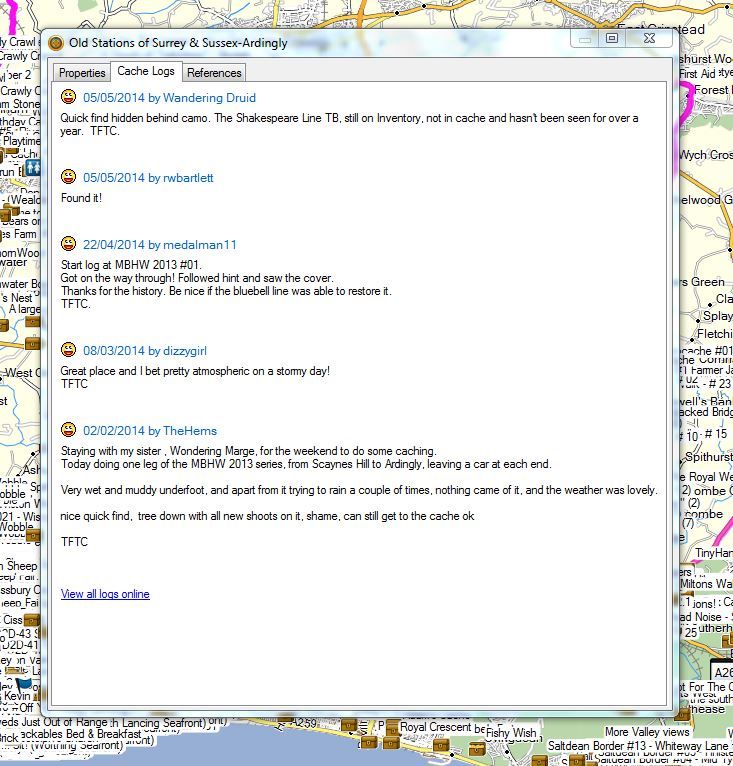
They're what they say they are. If you double click on a geocache in the map, or right click it in the lower left hand pane and select Open, so you can see its properties there is a Cache logs tab ... the detail for that tab is in the GeoCacheLogs folder.
The reason I am pursuing this is that I have been updating/uninstalling/reinstalling to get to the most current Basecamp and City Navigator map, as well as moving the db to Dropbox to share. I had over 4000 files in there maybe left over from my older install? a number that didn't seem to change as I did all this. Then I deleted everything to start fresh and reinstalled and also imported a new gpx of 10000 caches (now using GSAK's lite version) and now it's at 988 rather than the 4000. Just not sure exactly what is generating this specific number. Also, when I look at the properties as you suggested, I can't find any caches out of my 10000 that have something other than "View all logs online." I'd like to see an image of what that would look like if an actual log is in that tab. Thanks for helping.