BaseCamp 4.3.0.2 BETA is Now Available

Former Member
Former Member
BaseCamp 4.3.0.2 BETA is now available and can be downloaded here:

http://developer.garmin.com/apps/BC/BaseCampBeta_4.3.0.2.exe.zip

You will need to unzip the file before installing.

This release does not support XP.

You do not have to uninstall BaseCamp 4.2.5 and it will not overwrite that installation. The BETA and an official release of BaseCamp will live side-by-side but must be used separately. However the 4.3.0.1 BETA will be replaced.

Below is a list of changes. This is only a BETA release.

Added “Find Intersection” to the Find menu
Added parsing of the primary find text into address search fields
Improved ordering of auto-complete results
Improved street auto-complete results when searching for streets with prefixes and suffixes
Improved some usability issues with address and intersection searching
Improved recovery from corrupted cache information from device maps

Post here if you have questions.

The BETA is currently only for English users.

Before using this release, back up your data.

Please post any bugs you may find here. This release is to assist us in testing with a wider user base and wider set of devices. Bugs may be present, and any feedback is welcomed.

NOTE: We are aware of several issues with address searching on devices. We ask our users to please test this very well and let us know of the issues you find. Some of them will be duplicates of issues we have already found, but the advanced address search is new for this release and we need a good test bed to be sure that the feature is working correctly when we do the full release.

Again, thank you for all who participate.
  • Former Member
    0 Former Member
    Straight line waypoint to waypoint routing only.. routing following the road?? what's that??


    I think that was as much a function of early maps as the MapSource program.

    MapSource 2.00 has a date of Dec 31st 1998

    MapSource Version Information (historical)

    and the capabilities of PC's and units was much less back then. By MS 4.x (mid 2001) I had maps that contained routing data although the unit I owned at the time (eTrex Legend) didn't support it. I think the (expensive at the time) GPS V did however.

    MapSource lasted about 10-11 years. BaseCamp has been out since mid 2009 or so. Install a copy of BC 2.03 (I have the installer) and see how that compares with the latest :)

    PS: The oldest street map product I have is MetroGuide USA 4.01 which contains routing data. I know of MetroGuide USA 3.x, which you can find for sale on eBay, but don't know if it also contained routing information. Anyone know?

    PPS: Never mind. Found some pictures of the MG USA v3 CD's, on eBay, and they say "With PC Auto Routing".
  • Former Member
    0 Former Member
    Many MapSource users have probably forgotten how "fancy" it was in the very beginning... It too wasn't built in a day.

    Below is old image on my website shows what the early generation Mapsource "stick" maps looked like.... From my change logs, this is from year 2002.


    Straight line waypoint to waypoint routing only.. routing following the road?? what's that?? This was back in the days of the Garmin GPS III+

    ---------------------------------------

    One function I would love to see is that the graphics icon chosen when defining a waypoint in BaseCamp would appear with the same graphics image when the route is uploaded to the new generation nuvi GPS units.

    Is that on the to-do list at some point in the future? I imagine that would require companion GPS firmware changes also, but should would be nice to have...


    It is on the road map, but I can't give you a date or a release. It is something that has been requested before and is being considered.
  • Former Member
    0 Former Member
    Sure ...

    Select a list in the top left pane that doesn't show on the map, if it does pan the map until it doesn't

    Now hit Ctrl + Alt + F to bring up the 'Find Options' box on the right. Location states 'Center of view'. Click on User Data so it's selected. Now hit Search.

    You don't get a search based on 'Center of view' but based on the list that is currently selected.

    Interestingly if you select the top level folder (All Data) then you do get the search of user data based on 'Center of view'.


    By All Data do you really mean My Collection? This seems to be actually working by design because we do take the search location into account for user data, however user data is map independent. It will find things spread out forever and sort based on your search location and the distance away the find is. I tried doing these steps and I find results regardless of where I am panned. Choosing a location in the text box will also yield the same results but ordered by distance. So if I have a waypoint in Seattle and a waypoint in Phoenix, and I search near Seattle, it will find both but put the Seattle waypoint first. Vice versa if my search is near Phoenix. This seems to be working correctly for me.
  • Sorry, yes, My Collection not All data.

    I agree in that with My collection selected and Center of view then you get the correct result.

    However as I said if you happen to have any other folder/list selected then all you get is the user data in that folder/list and not the expected (at least in my mind) user data closest to and then spreading out from 'Center of view'. I would have thought that if you select User Data then search from 'Center of view' it should do exactly that :confused:
  • Former Member
    0 Former Member
    Hey everyone, I'm running a monterra with the latest firmware updated 2 days ago, and im still finding problems with basecamp and my CN map. it runs so slow and wont load when you scroll around.

    My Rino had no issue .. ive tried older maps and different computer... and now i have tried this version of basecamp and it still doesnt work :(
  • Former Member
    0 Former Member
    Sorry, yes, My Collection not All data.

    I agree in that with My collection selected and Center of view then you get the correct result.

    However as I said if you happen to have any other folder/list selected then all you get is the user data in that folder/list and not the expected (at least in my mind) user data closest to and then spreading out from 'Center of view'. I would have thought that if you select User Data then search from 'Center of view' it should do exactly that :confused:


    This is indeed by design. We use your list selection as a filter. And hopefully the rational is explained. If you have a LOT of user data, it slows the search down. We have some users that have tons of data and always searching all of it is problematic. So we use your selection in the folder list as a filter to bring down the amount we are searching through. Also remember that user data is not map dependent so we want as many results as possible within reason.
  • Former Member
    0 Former Member
    Hey everyone, I'm running a monterra with the latest firmware updated 2 days ago, and im still finding problems with basecamp and my CN map. it runs so slow and wont load when you scroll around.

    My Rino had no issue .. ive tried older maps and different computer... and now i have tried this version of basecamp and it still doesnt work :(


    I will try your issue here tomorrow when I come in. I do know that if you have a lot of data on that device it will take a while to do things. MTP, or Media Transfer Protocol is not well implemented on Windows and developers struggle with it. Mass Storage on the other hand... much easier to use.
  • This is indeed by design. We use your list selection as a filter. And hopefully the rational is explained. If you have a LOT of user data, it slows the search down. We have some users that have tons of data and always searching all of it is problematic. So we use your selection in the folder list as a filter to bring down the amount we are searching through. Also remember that user data is not map dependent so we want as many results as possible within reason.


    Well if that's by design then it's poor design and needs changing.

    Let's say I'm planning a holiday trip. I create a new list called Holiday. I put my start location in. I want to stop over on route to my final destination, and have used various hotels etc in the past. I pan the map to the area where I want to stop and try to search user data based on center of view, so I can see where I've stayed, what I've done in that area before. No go ... despite having center of view selected all it gives me is my original starting location as it ignores 'center of view' and defaults to my selected list!

    How is that helpful? How is a user expected to know that to achieve what is required he needs to switch to My collection? Even knowing that he's now got to select My collection, then do a search of user data, then switch back to the folder he was originally working in. The whole thing smacks of design by someone who's never actually used Basecamp for planning trips.

    It's pointless saying the list is a filter, as when you start a new list it's not 'filtering' anything that would give the required result. So in selecting My collection (in order it seems to make Center of view work for a search of user data) Basecamp has to search through all data anyway. Neither is the map selection important, it's searching user data, not map data. The daft thing is that a POI search (which is searching map data) DOES search from center of view!

    So ... the two searches, POI and User data, both with Center of view selected, act differently. One (POI) does indeed search from Center of View, the other (User data) only searches whichever list/folder is selected and ignores Center of view. That's completely inconsistent, apart from not providing the result that users would expect/want and IMO isn't 'by design' ... it's a bug :o

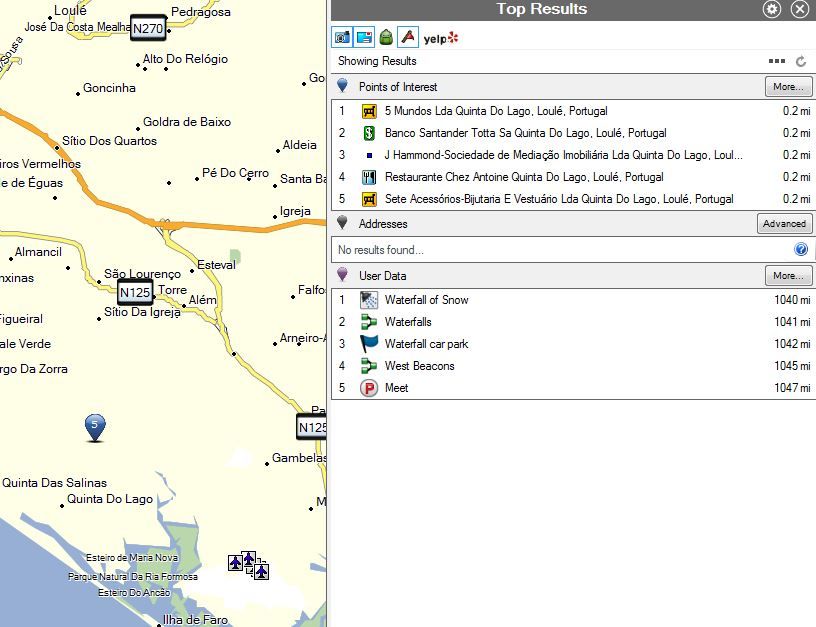
    Here's a screenshot of what happens when I search for both POIs and User Data at the same time with 'Center of View' selected, and the map centered on Portugal, I get POIs in Portugal and user data in Wales (just because I have a 'Wales' list selected). Doesn't make sense does it?


    Needs rethinking please.
  • Former Member
    0 Former Member
    For a number of technical reasons the behavior will be staying the same currently. However, I did make one concession. See the following screenshots below this post. We now do as the Mac does on PC where we say "User Data in <list or folder name>" It will refresh with every search you do. I do agree that users did not have a way to know where they are searching so this is the compromise for today. This is not in the beta.


  • Former Member
    0 Former Member
    This looks like you have some bad .NET frameworks installed or some kind of corruption has been installed. We do a lot of Win8 testing so I have not seen this before. There are some posts about the app not running that might assist you. I will do some research on this.