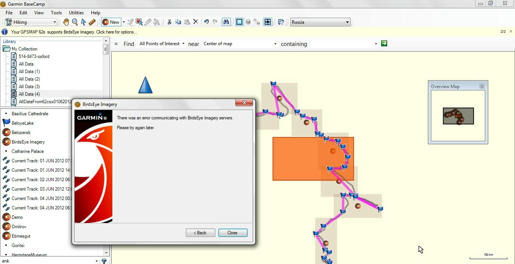
BirdsEye Imagery servers defect?

Former Member
Former Member
Hi,
Tomorrow (4th June 2012) will my BirdsEye subscription expires, I will load new ones, however, it says since one week:
"There was an error communicating with BirdEye servers, pls try again later", which I do since one (or more) weeks.
Any ideas?
Thanks for any help/hint/advice...!:mad:
  • Former Member
    0 Former Member
    You should probably contact Garmin support and ask if they can extend your subscription due to the problems. I don't think anyone here can help you.

    BTW, be sure to send all of the Birdseye that you have already downloaded to your GPS or a memory card before your subscription expires. This will unlock it for your device. After doing that, copy all the .jnx files from the Birdseye folder on the GPS/card back to a folder on your computer for future use.

    Once your subscription expires, you will no longer be able to send Birdseye to your GPS from Basecamp, regardless of the fact that you downloaded it while the subscription was active. But the files you have already sent to the GPS will continue to work.
  • Former Member
    0 Former Member
    You should probably contact Garmin support and ask if they can extend your subscription due to the problems. I don't think anyone here can help you.

    BTW, be sure to send all of the Birdseye that you have already downloaded to your GPS or a memory card before your subscription expires. This will unlock it for your device. After doing that, copy all the .jnx files from the Birdseye folder on the GPS/card back to a folder on your computer for future use.

    Once your subscription expires, you will no longer be able to send Birdseye to your GPS from Basecamp, regardless of the fact that you downloaded it while the subscription was active. But the files you have already sent to the GPS will continue to work.


    Thanks Ostroff01, good advice....BTW, (this should be interesting for the Garmin authorities), I tried the same on an other LT, the same failure again, then on my ancient LT, there it worked, thus, the first 2 LT s (failure) had the Windows 7 and the working old LT has the Windows XP, all LT s from the same place (network)... just for your records...I have to find out, why the connection from Window 7 does NOT work, but windows XP works...Thanks again for the hints...:)
    P.S.: LT = LapTop
  • Former Member
    0 Former Member
    Hi again,
    Meanwhile I wrote to Garmin Support and asked for a extension of my expire date (which is today), and explained the problem.
    I've downloaded with my ancient OS windows XP LT several images, I will have several questions to the Forum regarding that later.
    What my biggest worry by now is the BirdsEye images error announcement, also here I do expect help why I can not download from this very brand new LT BirdsEye images! Details about my LT, BC and my GPS are given as below.

    LapTop:
    OS Name: Microsoft Windows 7 Home Basic
    Version: 6.1.7601 Service Pack 1 Build 7601
    OS Manufacturer:Microsoft Corporation
    System Manufacturer:Hewlett-Packard
    System Model:HP Pavilion g6 Notebook PC
    System Type: x64-based PC
    Processor: Intel(R) Core(TM) i5-2430M CPU @ 2.40GHz, 2401 Mhz, 2 Core(s), 4 Logical Processor(s)
    BIOS Version/Date: Hewlett-Packard F.41, 11.10.2011
    SMBIOS Version: 2.7
    Hardware Abstraction Layer Version =: "6.1.7601.17514"
    Installed Physical Memory (RAM): 6,00 GB
    Total Virtual Memory: 11,9 GB
    Available Virtual Memory: 7,95 GB
    Page File Space: 5,95 GB

    Garmin BaseCamp: version 3.3.3
    Installed Drivers: gmnusb.sys version: 2.3.1.0

    GPSMap62s: Latest firmware Ver. 3.90 (7.76MB)

    Question 1: Any ideas how to solve this very terrible problem? I get always at this very new LT this funny error Garmin announcement, why do you think? What can be the reason?

    " />">

    I am planning a 2 weeks trip in ca. 20 days in Russia, where I am intending to record the whole tripuninterrupted for 10 days, (I know lots of batteries, andunfortunately, I will not have my LapTop with me, but an external antenna for my GPS ). (Remember, I will be always on the move, by ship, by car or just hiking).

    I learned, that the recording data (WP, tracks, etc) will be in the base memory (not in the SD card), and also the BirdsEye images are in the base memory (not in the SD card).
    Question 2: If this statement above is true, how can I manage the whole continuous recording at the best optimal way?
    First I thought, I can put the BirdsEye images to several 2 GB SD cards, to replace them by arrival of the different targets, but now, I see that will not work, or?

    I will have 8 BirdsEye images, ca. 900MB to 1 GB
    As mentioned above I need lots of space in my GPS (tracks and WP recording continuously for 10 days).
    What are your suggestions/advice regarding this problem? (I have several 2 GB and one 8 GB SD cards).

    Question 3:

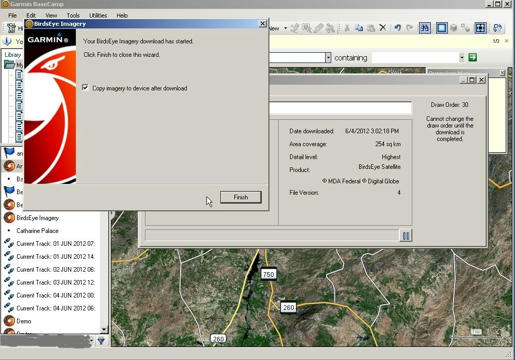
    I learned that my downloaded BirdsEye images should go first to my GPS, and then copy to my PC, to make sure that after expiration date I still can use them, I did "check" the window (small checkbox before finishing), as below, is this correct so far, what I did?

    " />">

    Thanks, any help/advice/suggestion or comment will be greatly appreciated.. :):confused:
    Peter
  • Former Member
    0 Former Member
    Question 1: Any ideas how to solve this very terrible problem? I get always at this very new LT this funny error Garmin announcement, why do you think? What can be the reason?

    -Sometimes the BirdsEye servers have issues responding. Sometimes you just have to wait for a bit and try again at a later time. If you continue to have this problem please post here or send me a message and I can try to help you out..

    Please do so immediately, help, as mentioned earlier, at the same time, (with a delay of some minutes) in one LT (WinXP) it works, in one LT (Win7 my usual daily LT) it does still NOT work...so, something must be deadly wrong, or?

    -You can send Birdseye Imagery directly to your device OR to your SD card. In order to send it to your SD card, make sure your GPSMAP62 and SD cards are both connected to your computer. Select the BirdsEye imagery and select Edit->Send To->(Your SD card). Alternatively, you can select the BirdsEye Imagery and then drag and drop the Imagery onto your SD card.

    I know this procedure, and I did it...However, it works only if the bloody BirdEye Server works. Otherwise it does NOT work, see Q1
    (I do understand with your SD card, the part where the BirdsEye images are (folder "Garmin", I tried also in the part where the maps are (folder "Garmin", (because of more space), however, it was not recognized)
    -The BirdsEye imagery is always downloaded to your PC first (this is just how Basecamp works) and will remain on your PC until you elect to delete the Imagery. However, it is still a good idea to backup your imagery using your device. You can select the option just like you did int he screenshot OR do what I described in Question 2

    I know this as well....I did backup my GPS with the images, but I don't trust to restore at the very moment, as I do suspect that all here not working properly, and what it should be like in theory (I had deleted, because of space problem) one imagery in GPS, and could NOT get back again later, with all known methods.)
    Meanwhile, my subscription has expired, and I can not even transfer the images from LT and to GPS, and vice versa, as it goes to server again, and server shows error message again. With the working LT, server says, your subscription has expired, and I could get a small part as demo, if I want so. After the expiry it does all NOT work like in theory, described like here. Thus, I'll not use the "Backup-Restore" procedure by now, despite it wouldn't help me anyway.

    Summary for me is:
    -I can not place my images to the "Memory Card" as shown in BC left under my GPSMap62s. (I thought this would solve the space problem). Images are recognized only if they are under "All Data", e.g. "Garmin-BirdsEye Folder)".:(
    -I can not work with my LT as the BirdsEye server shows always an error announcement (see photo1):mad:
    - If I work with the old LT, it says "Expired", and does NOT allow to transfers, only for "Demo", even if the images were downloaded when I was subscribed properly.:mad:
    -Priority for me is now to solve the bloody BirdsEye Server issue, and this has to be done by GARMIN only....or who ever is responsible for this...
    -I do assume that this forum is the official forum for Garmin issues, but I am not sure about it.:confused:

    Thanks anyway.

    P.S.1: For Admins: The subscription issue for the messages does NOT work, I did not get any email, I had to check always the forum again and again, thanks.
    P.S.2: I still did NOT get any response from the "Garmin Support", almost 3 days, it seems, even they got knocked out from these problems...:-)))))