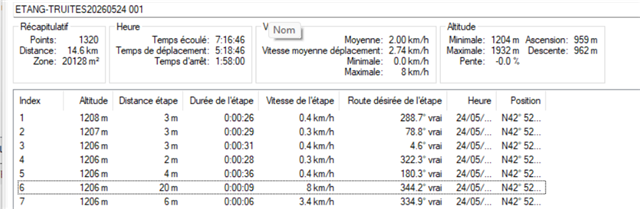
It's not described in garmin documentation, but it's seem it's the only explanation to the value de <gpxtrkx:Distance> attribute of gpx track by garmin using Garmin64S.
See under a sample:
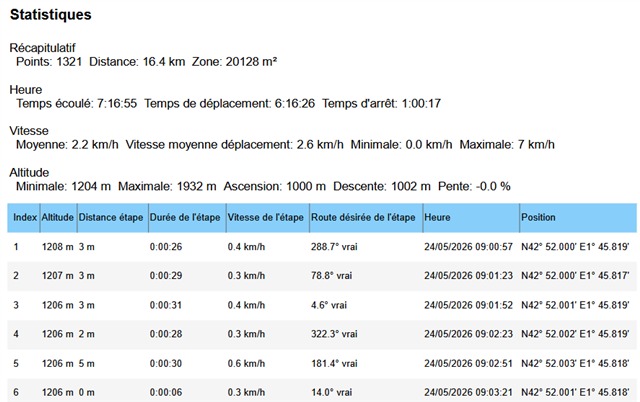
It's not described in garmin documentation, but it's seem it's the only explanation to the value de <gpxtrkx:Distance> attribute of gpx track by garmin using Garmin64S.
See under a sample:

…In basecamp, make a duplicate of this track. In the properties window select and delete point 6. This will force a recalculation of the statistics and they will be based on the track log.
The track log recorded 1320 points. The trip computer used over 26,000 points (it determines a position in 1 second intervals).
GNSS does not give a true position. The direction and magnitude of error…
A saved or sent track contains statistics based on the trip computer and the track log.
Devices determine a position every second. The trip computer calculates then distance, direction and elevation between two positions. The change in position is also the speed in m/s (1 sec interval between positions). The programing probably uses a threshold value to determine moving or stationary. If moving add 1 to moving time; distance to total distance, elevation change to ascending or descending based on sign. If stationary, add 1 to stationary time. The distance value is likely rounded to the nearest meter at the end of the track.
The track log records positions based on it's own logic or your setting. I assume you added up the leg distance column to obtain the 14km56, and added the ascending/descending values to obtain 14km78. If you did this, you included distances recorded for stationary movement that were rejected by the trip computer. You also suffer from rounding errors in each leg distance.
In basecamp, make a duplicate of this track. In the properties window select and delete point 6. This will force a recalculation of the statistics and they will be based on the track log.
As an aside, adding ascent/descent to horizontal distance does not give total distance. Climb 10m over 100m horizontal is a distance of ~100.5m not 110m. Climb 100m over 100m horizontal is ~141m not 200m.
Climb 100m over 100m horizontal is ~141m not 200m.
of course, I use pythagore
I assume you added up the leg distance column to obtain the 14km56, and added the ascending/descending values to obtain 14km78.
I import track in qgis, then export track data using CRS Lambert93 (so in cartesian projection), then using Excel, I compute distance thanks to Pythagore
In basecamp, make a duplicate of this track. In the properties window select and delete point 6. This will force a recalculation of the statistics and they will be based on the track log.
you're right, the statistics are ok now
and it's the horizontal distance : 14km56 rounded to 14km6
btw, if I delete a non-zero distance, the result is the same, it's just a way to ask Bascamp to recompute stats

The trip computer calculates then distance, direction and elevation between two positions. The change in position is also the speed in m/s (1 sec interval between positions).
BTW, I don't understand your explanation, and why the gps device records a wrong statistic in "gpxtrkx:Distance" attribute. I guess BaseCamp just read this attribute without any new computation. So the issue is Garmin 64S computation
This track was recorded by the Garmin64S of one of my friends
She asked me why her gps device gave a wrong distance in comparison with the distance computed by the hikers's others devices (smartphones, watches,etc) and in comparaison with the result given by opensource software like gpxsee, gpx_editor or viking.. This is why I computed myself the distance in cartesian projection using Qgis and Calc.
1.5 km error, it's around 10% error even if even if it flatters the hikers' ego
I own myself an older one , I will check if the issue was there also
The track log recorded 1320 points. The trip computer used over 26,000 points (it determines a position in 1 second intervals).
GNSS does not give a true position. The direction and magnitude of error varies. The more points collected the greater the cumulative error.
Determining motion at a 1 second interval can be done simply by looking at the distance between adjacent points. In the track log it is easier to use speed.. The first 5 points in the data you provided indicate 16m of movement. According to the internet, turtles walk around 0.8 to 1.6 km/h. If I assume your friend is faster than a turtle, the speed column suggests that your friend was stationary and that 16m should not be included in total distance.
If one were to collect data while walking a perfectly straight line, all of the collected points would not fall on that line. The distance based on all of the points would differ from that using just the first and last point.
Garmin didn't always included the stats from the trip computer. But they were getting a lot of questions from people wondering why the trip computer distance differed from the track log.
Too many points accumulates to much error. Too few points does not accurately capture the curves in the true path.
The trip computer used over 26,000 points (it determines a position in 1 second intervals)
Thank you very much for yours answers
Do you mean odometer of "trip computer" use those 26 000 points?
and tracks only 1320 points?
What are the relations between "trip computer" parameters and "tracks" parameters?
No explanation in Garmin 64S docs
BTW, I do not have any issue with the tracks and its length, even if the collected points would not fall on a straight line due gps accuracy and moving speed.
I have an issue with the way Garmin fills the "gpxtrkx:Distance" attribute of tracks and the way trip computer works.
I read on other forum that the error of odometer can be between 10% and 40% due to slow moving speed of hikers and measure frequency
Of course I found also some mitigations and workarounds, like yours...
Do you mean odometer of "trip computer" use those 26 000 points?
and tracks only 1320 points?
Yes this is probably the case. A one second interval makes the coding easier. The calculated distance will be in meters. With a 1 second interval the distance value is also the speed in m/s. A different interval would require calculating the speed to determine stationary or moving (distance alone would not be reliable). So, yes the trip computer likely looked at and dealt with some 26 000 positions, but it doesn't store 26 000 points.
The trip computer doesn't show the final results of a trip but is constantly updating. The easiest way to do this would be to keep a running tabulation of time and distance. From a logic standpoint, the device takes adjacent position solutions and calculates the distance between the solutions. This value determines moving or stationary. Add the time interval to either moving time variable or stationary time variable. If stationary, ignore the distance. If moving, add the distance to the distance variable. Then convert the results to the user set device units for display.
Users have some control over the time interval for logging a point. The shortest fixed interval is or was 1 second. So this is probably the interval of the device determining a solution to position. Devices generally have a logic based non-fixed interval as a default. I can not tell you how it works. I would suspect that there is a maximum time interval when the unit must log a position. I could imagine a change in direction threshold would trigger a logging of data. Beyond that would be complete guess work.
The following is also guesswork. In the early days, the question of why the trip computer had a different distance than the track log was not a rare event. I suspect customer service got tired of dealing with this discrepancy. Someone made the decision to include the trip computer stats with log data when saving or downloading a track. This makes some people happy. But, as your friend noticed, it creates questions about the accuracy of Garmin devices compared to other devices. I agree that including the trip computer stats was a bad decision on Garmin's part.
Thank you very much
Thanks for the detailed explanation. The distinction between the trip computer's continuously calculated distance and the track log's recorded points helps clarify why the GPX gpxtrkx:Distance value can differ, especially during slow hiking where GPS drift has a greater impact.