Route help

Former Member
Former Member
I am new to the forum and new to this GPS. Had a 7200 but always used Mapsource to create a rt.

RV760, base camp ver:4.6.2

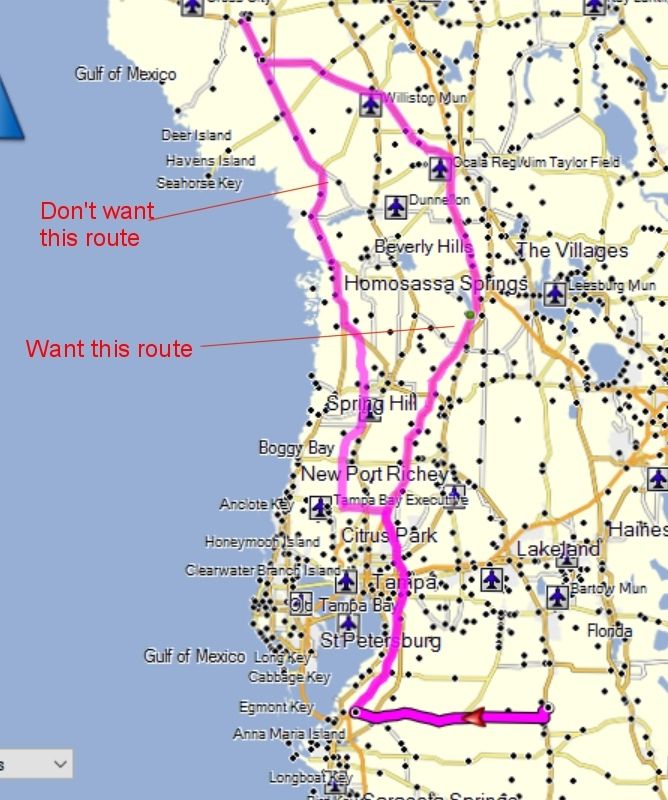
Created rt and wanted to change it to a way I know that's better (easier--less traffic). When I use alt and the hand it will change the rt but the old rt is still there. How do get this to work the way I want?

Also if I can download Mapsource can I use it to create/transfer routes? (Until I get the hang of basecamp!)

Thanks
DICK
  • MapSource will work with your device, but it will have to be set to mass storage mode so that MapSource can see it.

    Without more information I'm not sure why BaseCamp is causing you issues. If you only have one route then changing it wouldn't leave another unchanged route behind.
  • What do you mean by the old route is still there?
  • Former Member
    0 Former Member
    Thanks to you both for the replies!

    rkruz2--When I use 'alt/hand' to move the roads to how I want them, the original route generated by the program is still there. So I have 2 routes to the same destination. Not sure what will show up on the GPS!

    SUSSAMB--Where can I download Mapsource? How do I set to 'mass storage mode?


    Without more information I'm not sure why BaseCamp is causing you issues. Not sure what info I can provide to explain it. If you ask--I will answer!!!! :D

    Thanks again
    DICK

    PS: I replied to this already but it didn't show up. Not sure what I did wrong. Is there a delay before posts show up?
  • What you're describing can only happen if you have 2 routes and you change one, the other will still be shown. How did you get that route into BC? It would help understanding of your problem if you could post a screenshot of what you're seeing, including the detail in the left hand panes.

    As for MapSource and mass storage mode try a quick Google search.
  • Former Member
    0 Former Member
    Tried to duplicate the problem to get a screenshot and it did what I wanted this time.

    Going to google now for the other stuff.

    Thanks
    DICK

    (I'm sure I'll be back with more questions!!!!)
  • Former Member
    0 Former Member
    What you're describing can only happen if you have 2 routes and you change one, the other will still be shown. How did you get that route into BC? It would help understanding of your problem if you could post a screenshot of what you're seeing, including the detail in the left hand panes.

    As for MapSource and mass storage mode try a quick Google search.


    Giving me 2 routes happened again. I tried to upload a screenshot and it keeps failing. Tried resizing (down to 86KB) to see if that helped but no go.

    Thanks
    DICK
  • To include a screenshot you need to host it somewhere like flickr or photobucket and then post the link.
  • Not sure from your screenshot what you've done but looking at the fact just the little part at the bottom is highlighted it looks like you have 3 routes showing. Click on the one you say you don't want. The whole route should be highlighted. You can then delete it and see what's left.

    We really need though to see what's showing in the left hand panes as well as just the map to understand what's going on here. What is listed in the lower left hand pane?
  • Former Member
    0 Former Member
    I've got it right now. Don't know how I did it but!!!! I think it's happening because I input the start and end points and as I try to reroute to the way I want to go I end up with 2 ways to go.
    You mentioned erasing a route---how do you do that? I've tried different ways including 'new route' and the former route is still there. I tried the 'help' but couldn't find any reference to erasing.

    I appreciate you taking time to help me out. BC is a lot different from Mapsource. I usually create my route in Microsoft Street & Trips and then go to BC and try to set it up the same way so I can transfer it to my GPS. Too bad I can't just transfer fro MS S&T!!

    Thanks again,
    DICK