Do you have one, big img file or a large number of smaller files, accompanied by some other files with extensions like .tdb, .mdx, .trf and .typ?
In the former case: you can convert it with GMapTool, you will loose some functionality though. There is a Mac version of GMapTool, but that is very old and experimental, it probably won't run on a current MacOS. You will need Windows to run it properly. Easier way is to put that img file in a folder named Garmin on a USB stick. BaseCamp will read it, no need for conversion.
In the latter case: the map is an old registry type map. You can convert it with Garmin MapConverter, but it is a Windows program and the map needs to be installed and working on a PC. Alternative is JaVaWa MapConverter. There is a Mac version, but it's 32 bit, so it won't run on a current MacOS.
There are separate large .img files for different countries, none of them have other files that accompany them. I'm not clear about the USB, I can't copy them into the Garmin folder in BaseCamp where the maps live in on my hard drive? This is where I copied them to, but they're still not being read. I heard that if you rename them it may allow BaseCamp to read them, but I don't know if this works. I have a new Mac, so unfortunately these software fixes won't work.
Copying to the drive in your Mac doesn't work, BaseCamp reads this type of file only from an external drive. It doesn't need to be a physical drive though, a virtual drive also works: https://www.javawa.nl/virtualdevice.html
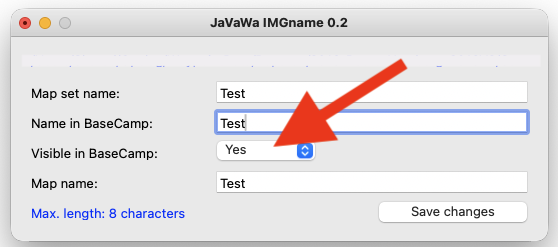
In certain cases it may be necessary to change te "visibility bit" in the file, use JaVaWa IMGname (64 bit) for that.
I had the files loaded on my external SD card on my Garmin Etrex that I plugged in, but BaseCamp still didn't recognize them there. So maybe it is a naming issue. I have JaVaWa installed, but I'm not sure what you mean about changing the visibility, is there a tutorial for this?
The program is called "JaVaWa IMGname", I made several programs.
There is no tutorial, but it is very simple to use. Drag the img file to the window of JaVaWa IMGname and set the option "Visible in BaseCamp" to "Yes". Next, click "Save changes".