This discussion has been locked.
You can no longer post new replies to this discussion. If you have a question you can start a new discussion

Disabling native power

На які показники впливає власна потужність і чи будуть відповідні дані скомпрометовані, якщо я вимкну власну потужність Garmin і використаю бігову потужність Stryd?

Top Replies

All Replies

  • At this point, no metrics depend on the Garmin native power. From other users experience, disabling the native power enables uploading Stryd data to 3rd party platforms like it was happening before. However, you will use the ability to use custom Garmin connect workouts with power targets, to use the native power gauge, and  to leverage the built-in threshold test/detection.

    I use both at the same time. I found there was a factor of around 1.4 between the 2 numbers. They have the same limitations when you run uphill or on a trail.

    I rely on Stryd for pace accurcay.

    I keep watch distance to GPS to enable auto-calibration when I get new shoes (I got caught with a manual calibration that I forgot to update, and my performance suddenly increased nicely, but it was all wrong).

    I also keep Stryd for additional race predictions I like that they give me a range and a power optimizer for custom distances. I found the predictions more realistic than Garmin's generic predictions, and similar to Garmin's course specific predictions.

  • Are you sure that no metrics depend on native power?  As, when I did a series of hill repeats, all of my training metrics seemed right (anaerobic score, stamina decreases with each hill, training load), yet my wrist HR was a a basket case- and didn’t respond much at all to the 30sec hill repeats. However, the power did capture the intervals and their intensity.  So- the watch did, somehow, figure out my intensity without using HR.  Maybe just based on running speed?

  • Yeah I am pretty sure based on my experience with hill runs compared with track runs.

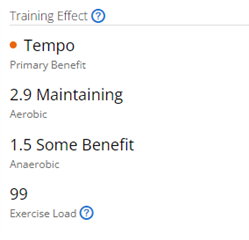
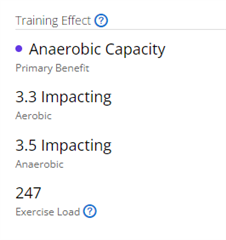
    Here is 8x400m hills repeats on a 10% grade hill (first graph) compared with the same 8x400m on a track (second graphs). The hills were a challenge for me and I ran the last couple of reps to exhaustion. I could have done a couple more track repeats.

    Training Effect

    Native Garmin Power around 460 for both

    Peak HR around 150bpm for both

    Stamina looks like a (mild) tempo pattern for the hills, and like an (excessive) anaerobic workout for the track

    Learnings:

    - Pace is essential to capture anaerobic effort

    - If you care about the watch metrics, don't run (steep) hills (although hill workouts are great for you)

  • To add to Etupes25's answer. It's actually the other way around also: running power does not depend on HR in any way (which is a good thing). The power estimation is based on your speed, physiological info, elevation changes, and running dynamics (+ wind at the nearest weather source, if you've enabled that, and your weather location provides wind info).

  • I also noticed that now the native Garmin power and the Stryd power have the same trends (even on hills), often their graphs are almost the same. I subtract 30% from the native Garmin power and focus on the Stryd power zones to get adequate zones for the Garmin. But you can divide the native power by 1.4. If you do a free workout, then both powers do not interfere with each other. If you do a structured workout, you have problems with audio alerts, the Garmin workout screen, and the Stryd data field. Another question, the hill running widget, among other things, also contains an indicator of power on the rise. Does the native Garmin power affect its rating or not?

  • The hill running widget also contains an indicator of power on the climb. Does the native Garmin power affect its rating or not?

  • If you do a structured workout, you have problems with audio alerts, the Garmin workout screen, and the Stryd data field

    I am curious what problems you saw. I didn't use Styrd IQ power during the hill run above, and I don't recall which older workout was using a power target.

    Another question, the hill running widget, among other things, also contains an indicator of power on the rise. Does the native Garmin power affect its rating or not?

    I do not know and it is a good catch. I have to say this metric is not top of mind as I focus on flat runs these days for the reasons quoted above. I read the description of that "running strength".

    "Hill strength expresses your ability to run uphill with power. It is about your capacity to attack uphill segments with a mix of high-intensity aerobic and anaerobic efforts. Building hill strength requires regular hard, high-intensity uphill efforts. Keep the relationship between grade and speed in mind as you work to enhance hill strength. Maintaining a slower pace on a steeper hill can require the same effort as a faster pace on a more gradual incline. Focus on consistent hard effort rather than pace"

    www.garmin.com/.../

    That could be interpreted as using power, but there could be other ways that would not require the power calcuation. For example, the watch has grade and pace since it calculates grade-adjusted-pace. This data could also be used to score how hard you were going up.

    Maybe other users have tried!

  • The main problem is the audio alerts for power zone violations that come from the main Garmin workout data field. Accordingly, this screen contains data about the native power of the Garmin, which does not correspond to the power of the Stryd. Regarding the power when running on hills, it is indicated that the watch collects information not only during running, but also during walking and hiking modes (for the latter, power is not provided). Perhaps the key in this case will be vertical speed and heart rate. In any case, it will be better to turn off the native Garmin power and run in the hills. If the indicator changes, then power is not included in its calculations. I will do so in the near future.

  • I was running with Stryd and Garmin and Garmin in smart mode for power. I got these exaggerated values any time the power changed on the Stryd workout. To try and overcome this problem, today, I switched to External source on power for running - i.e., using the Stryd sensors. All went OK for about 10 minutes; then power died to zero nomatter what I did. How do I get power working again on the Garmin 955 ? IT's a real pain since I'm now trying out Stryd workouts and Stryd workouts specify power level, not cadence, not speed, not heart rate. These are definitely in trouble now with power level of ZERO coming from the watch. Now, I can recover power levels later from the Stryd app, but what use are these when I've long finished trying to match power with that wanted by the workout when doing the workout in REAL TIME.

    Maybe this will recover in a few days as problems sometimes magically do? I did take the watch home, re-start it, re-start the computer, re-start all apps ... I'm not about to re-set garmin yet as I have done at times since I have too many screens set up the way I want ....

  • To try and overcome this problem, today, I switched to External source on power for running - i.e., using the Stryd sensors

    "External source" for Garmin power means a Garmin accessory -- chest strap or RD pod. Garmin power doesn't work with Stryd or any other 3rd party accessory.

    If you want to connect to Stryd within a Garmin activity (like Run), with full support for recording all the metrics that the Stryd mobile app needs, you have to use the Stryd Zones data field. If you want to do a Stryd workout, you probably want to use the Stryd Workout app (which replaces the Run activity.) In either case, I would recommend disabling native power completely, so you avoid having both Garmin power and Stryd power written to your activity (which causes problems with 3rd party services like Strava.)