BaseCamp 4.4.4 Is Now Available

Former Member
Former Member
BaseCamp is 4.4.4 now available and can be downloaded here:

http://www8.garmin.com/support/download_details.jsp?id=4435

This release does not support XP.

Installation of this version will overwrite your previous BaseCamp installation.

Here are the changes made in this version:
  • Fixed several issues when using the Pan Tool and the <ALT> key to move route points
  • Fixed autorouting issue where straight line segments were inserted after each waypoint
  • Improved track to route behavior. Now supports preserving the shape of track sections that aren't near a road.
  • Improved handling in situations where the computer is low on memory
  • Changed displayed route times to take layovers into account
  • Fixed issue with 'higher education' map symbols showing up as airports
  • Fixed certain instances of route direction text where the text was 'turn left/right' instead of 'bear left/right'
  • Fixed issue when recalculating a route via the context menu in the data list
  • Fixed various issues sending data to memory cards
  • Changed to automatically unlock BirdsEye for a device when sending the BirdsEye to a card in that device
  • Fixed various issues with Adventure search
  • Fixed issue sending ADM files to cards for marine devices
  • Added the command line option /Disable3D to disable the 3D view in BaseCamp. This was added to prevent startup issues with misbehaving graphics drivers.


Post here if you have questions.

The non-English language version of the software will be available through the in-application software update check shortly.

Please post any bugs you may find here.

Thank you all in advance for any feedback you may have.

*4.4.3 as a version number was skipped to be in-line with the Mac version.
  • Former Member
    0 Former Member
    Aaaagh!

    I first raised the issue of the absence of post code search in BC as long ago as January 2011: see https://forums.garmin.com/showthread...t%28al%29-Code. It will be seen that the response from Falagar was promising action then.

    I repeated the point in June 2012: see https://forums.garmin.com/showthread...8281-Post-Code - again more promises;

    I drew attention to these posts in someone elses thread on the same subject in January 2013: see https://forums.garmin.com/showthread.php?31506-UK-POSTCODE-search-in-Basecamp&p=161846#post161846 - and more promises.

    And, as SUSSAMB's response illustrates, I'm not the only one who has been raising the issue repeatedly.

    Here we are in late November 2014 and, despite the multiples releases in the meantime, it *still* doesn't work properly.

    *Please* could Garmin give this issue priority consistent with the length of time it has been extant and, more particularly, consistent with the repeated reassurances that have been given.


    Let me echo and reinforce this.

    In the UK the primary (and in some cases only) method of navigating on-road vehicles is the postcode. It is often the only piece of information asked for or offered. For a major Garmin product to not be able to cater for quick, convenient and reliable navigation by postcode represents a serious, arguably critical, failing. Repeated failure to get it right, several years after product launch, suggests that Garmin doesn't understand or doesn't care about UK navigation.

    If handling of latitude and longitude was as awful as the current postcode handling Garmin certainly would not have released the product. Fixing the postcode should now be the #1 priority.
  • Search function now broken:


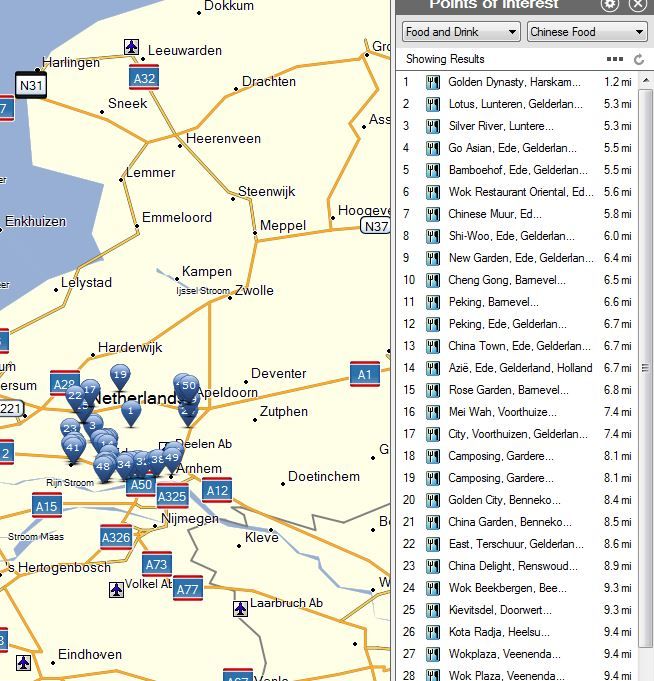
    Let me stress this one; since this really is a new bug; very easy to reproduce:

    Search for POI's an select a (sub)category - BC will not sub-select and keep showing all POI's


    Notice: The Dutch Royal Palace is NOT a chinese restaurant! ;)

    Would be a good idea to work with beta's again; the update frequency get a bit too high ;)
  • To be fair postcode input on GPS/satnavs works perfectly. And inputting a postcode directly into the search box top right in Basecamp also works. It's just that in BC the full address search is broken.

    As you quite rightly point out often it's the postcode that is the primary information in any address, and an address can be pinpointed in the UK with the postcode and number, no need for street name, city etc. It does need to be resolved and it's disappointing it hasn't been to date, particularly as we know the info is in the map and available, just that BC doesn't seem capable of utilizing it correctly.
  • Let me stress this one; since this really is a new bug; very easy to reproduce:

    Search for POI's an select a (sub)category - BC will not sub-select and keep showing all POI's


    It works when English is selected so if it's a bug it's when another language is selected.
  • It works when English is selected so if it's a bug it's when another language is selected.


    Nope, sorry:

    Even in English BC finds the Royal Palace as chinese restaurant...


    Note: after testing a bit I found BC at once ONLY showed chinese restaurants; even after changing to 'all POI's'. I didn't manage to reproduce however...
  • Although I have read about the spontaneously recalc issue on this forum <CUT> so I don't think it's a universal problem.


    As said in the 4.4.3 thread; I fully agree: In the Netherlands I have never heard of this problem. Could it be CN US related?
  • Nope, sorry:

    Even in English BC finds the Royal Palace as chinese restaurant...


    OK. I recentred my map on Holland and did a Chinese restaurant search, and all I got was Chinese Restaurants. As far as I can see it's working perfectly :confused:

  • OK. I recentred my map on Holland and did a Chinese restaurant search, and all I got was Chinese Restaurants. As far as I can see it's working perfectly :confused:


    Yep, that's what it should look like, but NOT working here! Not even after i cleared the Basecamp cache.

    Quite silly; everyone knows the royal palace is a hamburger restaurant, not chinese ;)

    HOWEVER:

    check the sequence below:

    - press the search icon right above
    - press 'more' at 'points of interest'
    - select food and drink - chinese - same problem as above

    - then press options (upper right icon)
    - at 'more options' chinese still is selected
    - then press search: only chinese restaurants will show

    (tested in BC - English language; dutch Win7 64k).
  • Yes, I see the same as you if I approach it that way ... the 'refresh' doesn't appear to be working correctly. That's definitely a bug.
  • That's definitely a bug.


    :)

    What was your approach then?

    While at it: two gereral remarks, not specific for this version:

    1.
    When searching for an adress after entering the streetname etc. you have to click the refresh button.
    Not everyone is aware of that. Couldn't you place a more clear 'search' button (or let it refresh automatically?).

    2.
    Via's are mostly set to 'alert on arival' automatically. It would be MUCH better is 'won't alert' would be default; esp. for motorcycling.
    Is it possible to change the default-setting? (would be happy to explain why current default is a major problem for many users).