BaseCamp is USELESS

Former Member
Former Member
** UPDATED **

BC cannot dispaly the Recreational Map of Europe (BaseMap) from my 550T. Crashes EVERY time the basemap is clicked on. Im running OpenGL 1.5 which is more than enough and have more than enough resource for the app to run. But it refuses to display any internal mapping of my 550T despite numerous reinstalls. Each time BaseCamp will quit after trying to display the BaseMap. In addition BaseCamp cannot import Garmin KMZ files as advertised, making BaseCamp totally useless for mapping!

Here is the Dump BC produces. (As yet Ive had NO reply from Garmin past few days).


App: BaseCamp
At: 01/04/2010 20:41:12 (UTC)
OS: Windows Vista Service Pack 2
Processor: x86, Processor Level: 6, Processors:2, Model: 15 Stepping: 11, RAM: 2086584
UNKNOWN-0-3.0.1.0

.NET FW Versions:
.NET FW 1.0 not installed.
.NET FW 1.1 not installed.
.NET FW 2.0 with SP2 installed
.NET FW 3.0 with SP2 installed
.NET FW 3.5 with SP1 installed

OpenGL Version:
OpenGL Version 1.5

Selected Map Product:
Recreational Map of Europe

Installed Map Products:
Name: Trip and Waypoint Manager v3
Id: xxxxxxx
Version: 3.0
Name: Global Map
Id: xxxxxxxx
Version: 2.0
Name: Recreational Map of Europe
Id: xxxxxxxx
Version: 3.0


Not enough storage is available to process this command
at System.Drawing.BufferedGraphicsContext.CreateCompatibleDIB(IntPtr hdc, IntPtr hpal, Int32 ulWidth, Int32 ulHeight, IntPtr& ppvBits)
at System.Drawing.BufferedGraphicsContext.CreateBuffer(IntPtr src, Int32 offsetX, Int32 offsetY, Int32 width, Int32 height)
at System.Drawing.BufferedGraphicsContext.AllocBuffer(Graphics targetGraphics, IntPtr targetDC, Rectangle targetRectangle)
at System.Drawing.BufferedGraphicsContext.AllocBufferInTempManager(Graphics targetGraphics, IntPtr targetDC, Rectangle targetRectangle)
at System.Drawing.BufferedGraphicsContext.Allocate(IntPtr targetDC, Rectangle targetRectangle)
at System.Windows.Forms.Control.WmPaint(Message& m)
at System.Windows.Forms.Control.WndProc(Message& m)
at System.Windows.Forms.ScrollableControl.WndProc(Message& m)
at System.Windows.Forms.ContainerControl.WndProc(Message& m)
at System.Windows.Forms.SplitContainer.WndProc(Message& msg)
at System.Windows.Forms.Control.ControlNativeWindow.OnMessage(Message& m)
at System.Windows.Forms.Control.ControlNativeWindow.WndProc(Message& m)
at System.Windows.Forms.NativeWindow.DebuggableCallback(IntPtr hWnd, Int32 msg, IntPtr wparam, IntPtr lparam)
at System.Windows.Forms.UnsafeNativeMethods.DispatchMessageW(MSG& msg)
at System.Windows.Forms.Application.ComponentManager.System.Windows.Forms.UnsafeNativeMethods.IMsoComponentManager.FPushMessageLoop(Int32 dwComponentID, Int32 reason, Int32 pvLoopData)
at System.Windows.Forms.Application.ThreadContext.RunMessageLoopInner(Int32 reason, ApplicationContext context)
at System.Windows.Forms.Application.ThreadContext.RunMessageLoop(Int32 reason, ApplicationContext context)
at System.Windows.Forms.Application.RunDialog(Form form)
at System.Windows.Forms.Form.ShowDialog(IWin32Window owner)
at System.Windows.Forms.Form.ShowDialog()
at bc.MainForm_t.HandleProductChanged()

*** Outer Exception:
Exception has been thrown by the target of an invocation.
at System.RuntimeMethodHandle._InvokeMethodFast(Object target, Object[] arguments, SignatureStruct& sig, MethodAttributes methodAttributes, RuntimeTypeHandle typeOwner)
at System.RuntimeMethodHandle.InvokeMethodFast(Object target, Object[] arguments, Signature sig, MethodAttributes methodAttributes, RuntimeTypeHandle typeOwner)
at System.Reflection.RuntimeMethodInfo.Invoke(Object obj, BindingFlags invokeAttr, Binder binder, Object[] parameters, CultureInfo culture, Boolean skipVisibilityChecks)
at System.Delegate.DynamicInvokeImpl(Object[] args)
at System.Windows.Forms.Control.InvokeMarshaledCallbackDo(ThreadMethodEntry tme)
at System.Windows.Forms.Control.InvokeMarshaledCallbackHelper(Object obj)
at System.Threading.ExecutionContext.runTryCode(Object userData)
at System.Runtime.CompilerServices.RuntimeHelpers.ExecuteCodeWithGuaranteedCleanup(TryCode code, CleanupCode backoutCode, Object userData)
at System.Threading.ExecutionContext.RunInternal(ExecutionContext executionContext, ContextCallback callback, Object state)
at System.Threading.ExecutionContext.Run(ExecutionContext executionContext, ContextCallback callback, Object state)
at System.Windows.Forms.Control.InvokeMarshaledCallback(ThreadMethodEntry tme)
at System.Windows.Forms.Control.InvokeMarshaledCallbacks()
at System.Windows.Forms.Control.WndProc(Message& m)
at System.Windows.Forms.ScrollableControl.WndProc(Message& m)
at System.Windows.Forms.ContainerControl.WndProc(Message& m)
at System.Windows.Forms.Form.WndProc(Message& m)
at bc.MainForm_t.WndProc(Message& aMessage)
at System.Windows.Forms.Control.ControlNativeWindow.OnMessage(Message& m)
at System.Windows.Forms.Control.ControlNativeWindow.WndProc(Message& m)
at System.Windows.Forms.NativeWindow.DebuggableCallback(IntPtr hWnd, Int32 msg, IntPtr wparam, IntPtr lparam)
at System.Windows.Forms.UnsafeNativeMethods.DispatchMessageW(MSG& msg)
at System.Windows.Forms.Application.ComponentManager.System.Windows.Forms.UnsafeNativeMethods.IMsoComponentManager.FPushMessageLoop(Int32 dwComponentID, Int32 reason, Int32 pvLoopData)
at System.Windows.Forms.Application.ThreadContext.RunMessageLoopInner(Int32 reason, ApplicationContext context)
at System.Windows.Forms.Application.ThreadContext.RunMessageLoop(Int32 reason, ApplicationContext context)
at System.Windows.Forms.Application.Run(Form mainForm)
at main(String[] aArgs)


Attached File: MiniDump

  • Former Member
    0 Former Member
    Thanks Zhenkel. For the record, I don't agree with the thread title. I think you've made terrific strides with BaseCamp and find it highly useful--most especially, the ability to view KMZ files. But it's probably better to think of the program as beta until the wrinkles get ironed out.
  • Former Member
    0 Former Member
    Thanks Zhenkel. For the record, I don't agree with the thread title. I think you've made terrific strides with BaseCamp and find it highly useful--most especially, the ability to view KMZ files. But it's probably better to think of the program as beta until the wrinkles get ironed out.


    Yes Fritz but then you would say that with it WORKING on your system! lol Several of my colleagues have the exact same problems as I do.. One whom cannot even start BaseCamp on her XP sp3 machine without it quitting!

    I have no doubts BaseCamp will eventually develop into a great utility, but to introduce a Paying service that relies on it in its current state is simply not good business.

    I would say BaseCamp in our experience has Alpha testing behaviour... Therefore the title of this thread reflects our experience this software without exaggeration. The non-Birdseye subscribers here have reverted to using Memory-Map, MapSource apps to plan their routes.

    I hope to see a working BaseCamp very soon...
  • Former Member
    0 Former Member
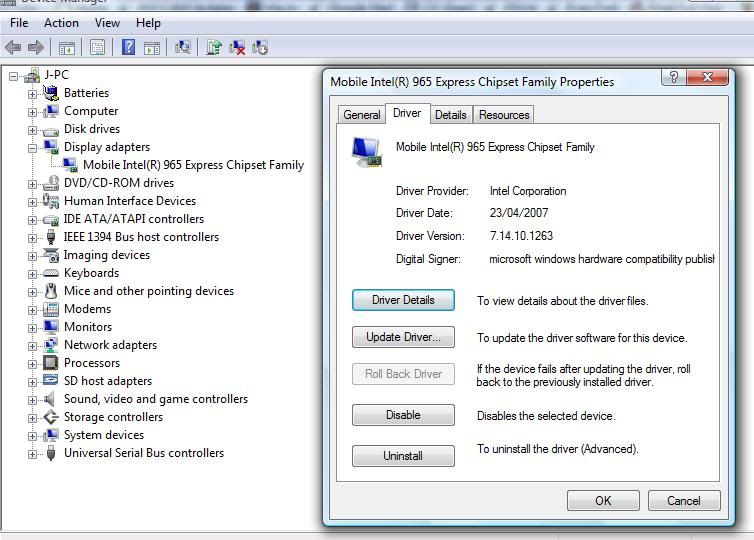
    Stingray can you please Device Manager to get the Driver Date and Driver Version for your video card? I'd like my setup to be as close as I can get to yours while looking into the crash.
  • Former Member
    0 Former Member
    Stingray can you please Device Manager to get the Driver Date and Driver Version for your video card? I'd like my setup to be as close as I can get to yours while looking into the crash.


    hello Zhenkel,

    I have attached a screenshot..

    The Vista Machine is a 2 year old Toshiba LapTop U300 15P T7700 Centrino DualCore with 2GbRam, VISTA HP 32bit, loads of disk space at 7.2Krpm. Intel Graphics Internal.

    http://i283.photobucket.com/albums/kk293/jayZ67/gf.jpg

    This is the latest available driver for my machine.

    thnx.
  • Former Member
    0 Former Member
    Custom Map problem resolved (I Think)

    I've been battling the "unable to communicate..." message that Basecamp sends to many custom maps that work fine in Google Earth (and the previous version of Basecamp). I've tried lots of things, but the thing that has my custom maps up and running on the latest Basecamp version is the transparency setting.

    I made my custom maps from NOAA raster charts for the Columbia River. They all conformed to the rules as to number of tiles, and file size, etc. But using MapC2MapC I was selecting the "transparent kmz" choice. This is great for Google Earth, but NOT in the latest version of Basecamp. After using the "properties | location | transparency" option in Google earth and selecting the maximum opacity, for each tile, my custom maps now load successfully in Basecamp version 3.0.1. So this version of Basecamp does not seem to like the transparency setting to be less than max, or else MAPC2MAPC does not set the transparency parameter according to the new Basecamp version's liking.

    I hope this helps others!

    -Dale-
  • Former Member
    0 Former Member
    Stingray,

    I was able to downgrade my laptop to the same versions of the Intel 965 drivers that you are running and saw quite a few problems with the 3d view in BaseCamp. None of the crashes that you are experiencing but that could be due to other differences in hardware.

    While investigating further I was able to find a number of disgruntled users on the Toshiba boards that were complaining about 3d errors while using that same driver as well as developers on Intel's boards that were experiencing OpenGL issues that Intel claims were fixed in later versions of the driver.

    Finally on a personal note, I remember crashes playing 3d games on my old laptop before I finally went out and forced the Intel provided driver update to install on the laptop.

    To help walk you and others through the process I setup a thread at https://forums.garmin.com/showthread.php?t=7413 based on the steps I just used to load the 2/26/09 version of the 965 drivers onto my laptop.

    After the upgrade the BaseCamp 3d view issues I saw earlier disappeared. Please let me know if switching driver versions helps eliminate the problems you are seeing as well.
  • Former Member
    0 Former Member
    ZHENKEL, I very much appreciate your efforts on this. I will give this a try later today and let you know the outcome.

    Thanks.
  • Former Member
    0 Former Member
    Stingray,

    I was able to downgrade my laptop to the same versions of the Intel 965 drivers that you are running and saw quite a few problems with the 3d view in BaseCamp. None of the crashes that you are experiencing but that could be due to other differences in hardware.

    While investigating further I was able to find a number of disgruntled users on the Toshiba boards that were complaining about 3d errors while using that same driver as well as developers on Intel's boards that were experiencing OpenGL issues that Intel claims were fixed in later versions of the driver.

    Finally on a personal note, I remember crashes playing 3d games on my old laptop before I finally went out and forced the Intel provided driver update to install on the laptop.

    To help walk you and others through the process I setup a thread at https://forums.garmin.com/showthread.php?t=7413 based on the steps I just used to load the 2/26/09 version of the 965 drivers onto my laptop.

    After the upgrade the BaseCamp 3d view issues I saw earlier disappeared. Please let me know if switching driver versions helps eliminate the problems you are seeing as well.


    Unfortunately the graphics drivers for my Toshiba laptop are specific from Toshiba! Downloading the drivers from Intel will NOT be compatible with my system. Have tried and its failed. Toshiba have confirmed I have the latest drivers and there are no further updates. Latest driver: February 2007! Ridiculous!

    I dont understand why BaseCamp would now be so problematic? I use MemoryMap with a 3D function on my 1:50K OSGB mapping, and that works fine! What is different of BC3.0.1 to previous versions that it needs so much extra power? It needs to be able to run on older machines! (even though mines only just 18months old!) lol

    Also transferring the downloaded data to the GPSr doesnt work properly. Most of the time is doesnt transfer. This s what I have to do:

    1. After downloading Birdseye (Yes, I did subscribe to it after saying I wouldnt! but in the hope something would work!), I shut down BaseCamp.

    2. I then connect my GPSr (if its not already connected.. sometimes I will disconnect my GPSr just after a BE map starts to download as they take so long).

    3. Restart BaseCamp

    4. DRAG the BE file to the G drive. If I simply right click and use send to.. nothing usually happens on files larger than a couple of Mb.

    However, even the method I use above is not that reliable. Though the G drice says data is transferring, nothing appears to be happening and I can wait upto 10 minutes for the transer to actually START taking place, if it hasnt already crashed by then!

    NOTE: The 3D views are fine on my system.. as mentioned earlier, problems relate to file transfer and the reading of the BaseMap (Recreational Map of Europe) from the GPSr. In addition I will say BaseCamp is very, very sluggish (slow) on my system and when starting my system in the morning, BaseCamp will often crash. It can take more than just one start up to get it running. This is a problem Ive later experienced since my inital posts here and is now standard on my system.
  • Former Member
    0 Former Member
    Stingray,

    The crash that you started out the post with has to do with map drawing which is why I suspect the driver version. A number of similar reports have been traced to drawing errors after switching map products. That seems to correspond to what you reported with the crashes happening after you tried to start using the Rec Map of Europe from your card.

    The Lenovo laptop I did my driver upgrade on yesterday is in exactly the same situation as your Toshiba. The "official" release from Lenovo is significantly older than what I could download from Intel. The exe installer from Intel wouldn't run for me either but downloading the zip from here (Intel Mobile 965, Vista 32) and using the steps in the post worked for me.

    Doing a better job of reporting device transfer progress is an item that we have plan to fix in a future version. Right now its possible that data is actually being copied but the bar only moves as big jumps because intermediate progress isn't being shown.
  • Former Member
    0 Former Member
    ZHENKLE,

    The orginal post says that I cannot diaply my BaseMap.. the drawing doesnt even begin. I didnt suggest it was a drawing problem, its more to do with the ability to read what is on my card .. I think?! When I see that maps from my OSGB (those BaseCamp cannot read properly the OSGB Discoveres yet according to one of your posts!), I do see the Shaded Relief map.. and when I switch to 3D that doesn cause any problems.

    So let me make again make clear the problems:

    1. CANNOT read BaseMap (Recreational Map of Europe).. will crash IMMEDIATELY on that map, either from the ull down menu or from the left hand coloumn.

    2. Cannot import KMZ files.. I read also from one of your posts this is "Work in Progress"

    3. Transferring large(ish) BE maps can casue the app to destabilize.. i.e. right click on map to send to my E drive.

    I appreciate your time, thank you.