This discussion has been locked.
You can no longer post new replies to this discussion. If you have a question you can start a new discussion

Cadence measurements wildly unstable

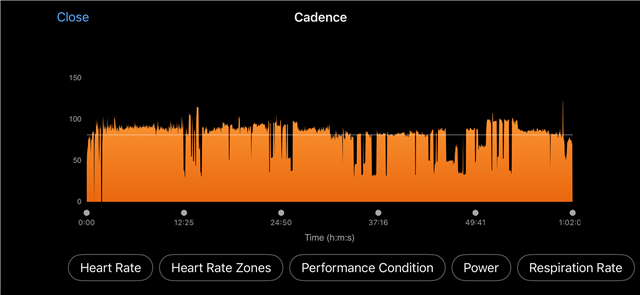
My only two month old Tacx was giving bizarre measurement of cadence today. I’m connected to Zwift and to an Edge 1040 and both display the incorrect values. The cadence measurement was suddenly and randomly dropping by half or more. I could see no pattern. Has anyone seen this and can help me understand what’s happening? How I might fix it? I’ve never faced this problem before and nothing has changed in the setup. Firmware is 2.7.0
  • use a dedicated cad sensor on the bike. that will be accurate and stable. or if you have any powermeter on the bike, you can use its data in Zwift as cadence

  • Thanks for the tip. I could do this, but when paying 1000+ euros for a trainer I expect it to be accurate. With measurements like this, it's not performing it's role. I would expect Garmin to have a solution here.

  • Mt cadence in Zwift from my Tacx Neo2T seems to have recently become unstable.  It dances around +-10 rpm.  It never did this in the past
    I've tried both BT and ANT+. 
    BT signal seems solid for all other signals.  My computer with an external BT antenna is only 1 meter away from the trainer.
    This is new, never happened in the past.

  • it was always an issue, with Neo1 if the power was very low (so under 150w, mostly under 100w) then the estimated cad was hectic. this proximity sensor in 2T is a garbage too, there are more problems with it than with the estimation in the Neo1... Tacx design, the Garmin already bought the company and the product with this problem... the indoor trainer sector at Garmin has the lowest priority imho.. so if You wanna problemfree workouts, buy this cheap sensor and use it and dont wait for ages (or forever) for a fix. (probably there is no fix, it is hw/design failure...)

  • I've never had this problem for 5 years using the Tacx Neo 2t for many, many hours.  I haven't been doing cadence drills for some time, so never noticed it until today. 
    It seems it may have something to do with the firmware update that introduced virtual shifting and race mode. People have cured it with a firmware roll-back, but it seems you need help from someone at Gramin that actually knows it is possible, and how to do it.
    I've turned off race mode, I'll see if that makes any difference.
    Using a separate cadence sensor is a pain.  My wife and I share the trainer.  It is bad enough that Zwift does not remember HR sensors and Play controllers for each individual account, I'd rather not have to pair a cadence sensor every time as well.

    forums.zwift.com/.../22

  • when we last used zwift with my gf we didnt need to re-pair the sensors , just hop in and ride. (win10) if you have pc too, delete the knowndevices.xml and re-pair everything. if not pc, like appletv, uninstall and install the entire app from store. 

    the firmware updates were always critical at Neos, in the past there were many many bricked units. maybe now the cad issue is very "spectacular" but it was always in the background.

  • Some interesting, if confusing test results:
    I turned off Race Mode in the Tacx app, and then tried it on TPV.  Cadence was as stable as a rock.  So thought it's either Race Mode on the TCX trainer, or Zwift.
    So I tried Zwift with Race Mode off.  Cadence was completely stable, as it always has been.  So then I'm thinking it is Race Mode.
    Turned Race Mode back on and tried TPV.  Cadence is still stable.  Well, that is starting to be confusing.  Zwift doesn't like Race Mode?
    Tried Zwift again, and cadence is still stable.  I have no idea!
    Maybe Toggling Race Mode off and on changed something?  I had my Garmin 955 start to eat a complete charge in 2 days suddenly, and turning off and back on again (The IT Crowd!) fixed that, so who knows what goes on the firmware of these things.
    Anyway, it appears my cadence reading is back to its usual stable reading.  All I can suggest is try turning off Race Mode with the Tacx app.  If that stabilizes the cadence reading, you can either leave it off, or try turning it back on again.

  • I have deleted the knowndevices.xml file and re-paired everything before.  We each have our own Play controllers, and heart rate monitors.  The Play controllers and HR monitor that show up in Zwift are always which ones were paired last.  The other person's Play controllers and HR monitor have to re-paired every time we switch bikes.  The trainer is the same, so it stays paired.

  • i see, now i dont have access to my indoor setup but i will check it next week. Via BT or ANT+ pairing? (the Play and HR), we used to use only ANT+ (and we had no Play). A Zwift app upgrade often a downgrade, adding 2 new "super" features but ruinin a 1 old good one...

  • Add me to your club. I updated from 0.0.38 to 2.7.0 and am dealing with the same, which is really messing with MyWhoosh trying to sync my avatar. I have 175mm crankarms and a magnet on the NDS near the sensor. I reset after the update (left off for 24 hrs), no success. Recalibrated several times, no success. Removed the magnet, no difference. For a machine this expensive, I expect a solution, but as a longtime Garmin consumer I'm increasingly disappointed. My blood pressure cuff reads absurdly high - I even scheduled a checkup and brought it with me, and they said I was wearing it properly but it simply reads (way) high (always). My Garmin scale jumps around. My Fenix 7X Pro doesn't support Mobility workouts, even though they're all just fit files so the change would be minimal. If I have to buy a cadence sensor it will not be made by Garmin, sorry - this is ridiculous (the change log even says this version fixes cadence problems - should have stayed at 0.0.38!).